Music Video vs. Music Visualizer: What's the Difference?
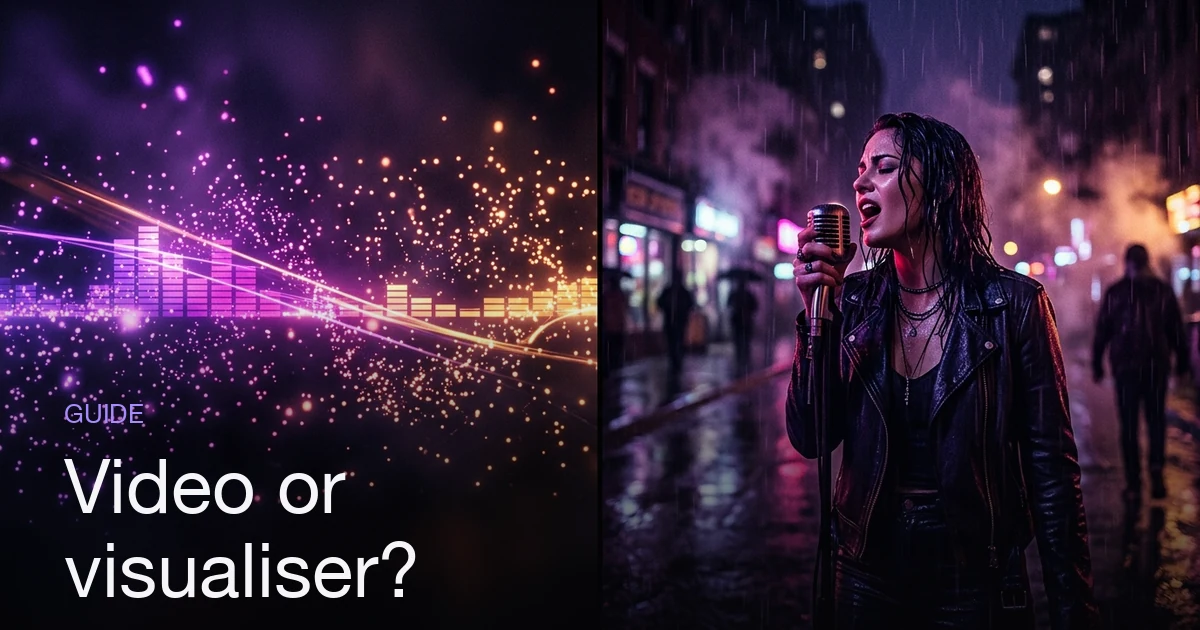
A music visualizer is audio-reactive abstraction: waveforms, spectrum bars, particles or a looping graphic driven by the track's amplitude and frequency. It is generated from the audio itself, so it is cheap, quick and endlessly repeatable — but it carries no subject matter, and every song run through the same template looks the same. A music video has subject matter: people, places, a point of view, and shots chosen deliberately rather than derived from a waveform. It costs more of everything and says something specific about one song. Use a visualizer for catalog tracks, Spotify Canvas loops, livestream backdrops and beat uploads, where the job is to give audio a moving surface. Use a music video for the single you are actually promoting, where you need someone to remember the song afterwards.
What's the difference between a music visualizer and a music video?
The short answer: A music visualizer is audio-reactive abstraction: waveforms, spectrum bars, particles or a looping graphic driven by the track's amplitude and frequency. It is generated from the audio itself, so it is cheap, quick and endlessly repeatable — but it carries no subject matter, and every song run through the same template looks the same. A music video has subject matter: people, places, a point of view, and shots chosen deliberately rather than derived from a waveform. It costs more of everything and says something specific about one song. Use a visualizer for catalog tracks, Spotify Canvas loops, livestream backdrops and beat uploads, where the job is to give audio a moving surface. Use a music video for the single you are actually promoting, where you need someone to remember the song afterwards.
The two words get used as if one is the budget version of the other. They aren't on the same ladder. They're different objects that happen to share a container, an MP4 with your song on it, and they fail in completely different ways when you pick the wrong one. The confusion is worse now that AI music video generators and visualizer apps sit next to each other in the same search results — our roundup of the tools separates the two categories, and half the products in that space quietly straddle them.
There's a single test that sorts almost every case. Describe the video to someone without playing the song. If you can say "a woman drives through an empty city at night and never arrives," you made a music video. If the only honest description is "colored bars move to my track," you made a visualizer. Neither answer is wrong. They're answers to different questions, and the rest of this post is about which question you're actually asking.
What a music visualizer actually is
A visualizer is a rendering of the audio signal. Software reads the track frame by frame and pulls out two families of numbers: amplitude — how loud the moment is — and frequency content — which parts of the spectrum are carrying that loudness. Those numbers get mapped onto visual parameters. Bass drives particle size or camera shake; treble shifts hue; overall amplitude scales a radial pulse or the height of every bar.
That mapping is the whole mechanism — if you want it unpacked properly, what a visualizer is and where the word comes from goes deeper on it. It is also why visualizers have one genuinely remarkable property: sync is free and perfect. Nothing is timed by hand, because nothing is timed at all. The image is a function of the audio, so it can't drift or be wrong about where the drop is. An editor cutting a real video to a track spends hours getting an approximation of what a visualizer gets by construction.
The family is wider than spectrum bars, too:
- Spectrum and waveform — the classic bars and oscilloscope line, still the default for beat and mix uploads
- Reactive album art — cover art that pulses, glows, or parallaxes with the low end
- Particle and fluid systems — smoke, ink, points of light pushed around by the frequency bands
- Generative shader loops — abstract geometry that evolves continuously, the lineage that runs from Winamp's Milkdrop through today's WebGL tools
- Reactive backgrounds with lyrics on top — the overlap zone with the lyric video
None of this is a lesser art form, and it's worth being blunt about that, because the "visualizer vs music video" framing usually smuggles in a hierarchy that doesn't exist. For lo-fi, ambient, instrumental, DJ mixes and beat tapes, a visualizer isn't a compromised music video — it's the native format. Nobody watching a two-hour mix wants a narrative, and a story-driven video over the same audio would be worse.
What a visualizer can't do is be about anything. It has no subject, so it can't tell you what the song means, who's singing it, or why you should care. It reacts to sound rather than responding to a song.
What a music video actually is
A music video has three things a visualizer structurally cannot have.
Subject matter. Something is in the frame that exists independently of the audio: a person, a place, an object, a world. It would still be there if you muted the track.
A point of view. Someone decided what this song is about, or decided to contradict what it's about. The video argues something — that the song is lonelier than it sounds, that the singer is a specific kind of person, that this is the third chapter of a story the last two videos started.
Deliberate shots. Framing, light direction, lens, and order are chosen. Every frame is evidence of a decision, which is the actual definition of a video looking cinematic — restraint and consistency, not budget.
The structural relationship to the song is also inverted. A visualizer is derived from the audio: the waveform generates the image. A music video is arranged against the audio: someone decides that the second verse gets three shots and the final chorus gets one long one, and that the cut lands on the downbeat rather than a half-second past it. That's a judgement about the song, not a measurement of it.
This is also where the harder problems live — character consistency across scenes, a look that holds from shot to shot, an idea that survives three minutes. A visualizer never faces any of them, because it has nothing to be consistent about.
Cost and effort: the honest comparison
| Music visualizer | Music video | |
|---|---|---|
| Input required | The audio file | The audio file and a concept |
| Where the time goes | Picking a template, tuning colors | Deciding what happens, then producing it |
| Marginal cost of the next one | Near zero — run the next track | Nearly the same as the first |
| Sync to the music | Automatic, exact | Planned, then executed |
| Whole-catalog output | Realistic in one sitting | Not realistic |
| Distinguishes one song from another | Barely | That's the entire job |
| Fails by | Being forgettable | Being incoherent or unfinished |
The row that matters most is the marginal cost. A visualizer's economics are the economics of a template: the second one is essentially free, which is why artists with a back catalog can give every track a moving surface in an afternoon. A music video's cost doesn't decay that way, because the expensive part was never the rendering — it was the deciding.
AI generation compresses one side of that gap and not the other. It removes the location, the crew, the shoot day and the edit, so the cost of a music video stops being a barrier to entry. It doesn't remove the concept — which is why a generated video made without a plan looks generic in exactly the way a visualizer never does. A visualizer isn't trying to say anything, so it can't fail at it.
What platforms and playlists actually expect
No platform requires one or the other. What differs is what the audience does when it arrives.
Spotify Canvas is a format, not a category. Spotify's published Canvas guidelines ask for a seamlessly looping vertical 9:16 clip of 3 to 8 seconds, between 720 and 1080 pixels tall, supplied as an MP4 or a JPG. Either kind of content fits: an abstract reactive loop made for the slot, or a few seconds lifted from a real video you already made. The second option is the underrated one — if you have a music video, your Canvas is a trim, not a new project.
YouTube is where the distinction bites hardest. A visualizer upload is completely legitimate, but it competes for attention with the auto-generated art track that already exists for your release, and looks similar in a thumbnail grid. A face, a location or a striking frame gives someone a reason to click that a waveform can't.
Short-form — TikTok, Reels, Shorts — is sound-first but scroll-stopped by images. Abstract motion is easy to scroll past; a person doing something is not. If short-form is your main promotional surface, that argues for footage with subjects in it, planned for vertical framing rather than cropped down afterwards.
Playlist pitching and press respond to what's around a release. A visualizer reads as "the track is out" rather than "there's something to write about."
When a visualizer is the right call
Plenty of the time, and not as a compromise:
- Album and catalog tracks. The single gets a campaign; tracks two through ten need a presence, not a budget. A consistent visualizer across the record is a coherent look, not laziness.
- Genres where it's the native form. Lo-fi, ambient, instrumental, house sets, beat tapes, background and study music. The audience is listening, not watching, and a story would intrude.
- Spotify Canvas. A short reactive loop is purpose-built for the slot, and seamless looping is something abstract motion does much more easily than footage of a person.
- Livestream and DJ-set backdrops. Only a visualizer can react in real time to audio that doesn't exist yet. No amount of pre-rendered footage does that.
- Deliberate withholding. Some releases are stronger without a face attached. An abstract visual keeps the song unpinned to a specific reading.
- Release volume. If you're putting out something every few weeks, the correct answer for most of them is a visualizer, so the occasional real video still means something.
The common thread across all six is scarcity of attention rather than scarcity of money. You only get to ask an audience to watch something a few times a year, and spending that on an album track is worse economics than spending it on the single.
When a visualizer isn't enough
The failure case is specific and common: an artist puts out the single they're actually promoting with a waveform over it, and nothing happens. Not because the visualizer was bad — because it was doing the wrong job.
A visualizer accompanies a song. It doesn't make anyone remember it. For a release you're pushing — pitching to editorial, running ads, asking blogs to cover it, building toward a body of work — you need something a stranger can hold onto afterwards. Ask what someone tells a friend the next day. "There's a track with a good beat" is what a visualizer earns. A video with a subject gets you "there's this video where…", which is the sentence that actually travels.
It matters more when you're building an identity across releases. A recurring artist persona — the same face, the same world, carried from single to single — is how a channel starts looking like a body of work. A visualizer template can't carry that, because it's identical no matter whose song is playing.
Three cases where the visualizer isn't enough: the lead single of a project, the track you're spending ad money on, and the release you want covered. Everything else is fair game.
The combination most artists actually need
Framing this as a binary is usually the mistake. Almost every independent release is better served by both, allocated by importance:
| Asset | What to make | Why |
|---|---|---|
| Lead single | Music video | The one thing that has to be memorable |
| Canvas for the single | 3–8s loop cut from that video | Free reuse; visual consistency across surfaces |
| Album tracks | Visualizer, one consistent template | Presence at near-zero marginal cost |
| Short-form teasers | Vertical cuts from the video | Subjects stop scrolls |
| Livestreams | Reactive visualizer | The only format that reacts live |
That allocation follows from one rule: make the expensive thing once, reuse it everywhere it fits, and let the visualizer cover the rest. One music video yields the YouTube upload, the Canvas loop, the vertical teasers and the still frames — a better return than four separate assets that share nothing. Full breakdown in the single release workflow.
Common mistakes on both sides
| Mistake | Why it hurts | Fix |
|---|---|---|
| Visualizer on the lead single | Nothing to remember, nothing to pitch | Save it for the album tracks |
| A different visualizer template per track | Loses the one advantage visualizers have — consistency | Pick one and hold it across the record |
| Treating a visualizer as a placeholder | You publish it, then never replace it | Decide up front which format the track gets |
| A music video with no concept | Generic footage reads worse than honest abstraction | Decide what it's about before producing anything |
| Making a Canvas from scratch when you already have a video | Duplicate work | Crop 3–8 seconds of it to vertical instead |
| Cropping a landscape video for short-form | Heads out of frame, dead space | Plan the vertical framing before generating |
Where Melodious fits — and where it doesn't
Melodious doesn't make visualizers. It's a music video generator: it reads your song's tempo, section structure and lyrics, writes a storyboard against that structure, and generates keyframes and clips with actual subject matter in them. There are no spectrum bars, waveforms or particle systems in it, and if a reactive loop is what you need, a purpose-built visualizer tool will get you there for less.
For the video side, the flow is short. Attach a song, describe what you want in one message, and press send: Melodious writes the storyboard and generates every keyframe in the same run. There's no interview, no length picker, and nothing to approve before the images exist. The credit cost for that run is stated under the composer before you send it, so you're not agreeing to a number you can't see.
What still takes a deliberate click is the video render. Turning keyframes into moving clips is the expensive stage and it keeps its own approval step — nothing renders because you sent a chat message. So the shape is: one message gets you a storyboard and stills, you look at them, and then you decide.
Everything the storyboard decided stays editable. Rewrite any scene's prompt, add or delete scenes, regenerate a single keyframe that missed, or reply in the composer — "make it darker," "sixty seconds instead." Reacting to a real storyboard is a much easier judgement than describing one from scratch.
When the run finishes you download the finished video from the workspace, and that one file is the source everything else is cut from: the YouTube upload, a vertical teaser, and a Canvas loop — trim 3 to 8 seconds that loops cleanly and crop it to 9:16 in any editor. Reformatting for each platform is currently your step, not the app's. Current pricing is on the pricing page.
Which one should you make next?
Two questions, in order.
Is this the release you're actually promoting? If yes, make the music video — the single you're pushing is the wrong place to save money, and it's the asset every other cut comes from. If no, a visualizer is a legitimate answer rather than a lesser one.
Would specific imagery help this song or narrow it? Instrumental, ambient, mix and background music is often better left open, and a visualizer keeps it that way. A song with lyrics, a character and something to say wants a subject in the frame.
Most artists get the ratio wrong in the same direction: they make visualizers for everything, including the one release where it costs them. Flip that. One video for the track that matters, one consistent visualizer template for everything else, and reuse the video everywhere a shorter format will take it. If you're deciding what that video should be, the concept list is the next thing to read.
Frequently asked questions
Is a music visualizer the same thing as a lyric video?
No, though they overlap and are often bundled in the same tools. A visualizer is driven by the audio signal — bars, waveforms or particles that move with amplitude and frequency. A lyric video is driven by the words, timed to when each line is sung, and its job is legibility rather than reaction. Plenty of releases are both: reactive background, lyrics on top. If the words are the point of the song, the lyric video is the more useful format of the two.
Does a Spotify Canvas count as a visualizer or a music video?
Either — Canvas is a format, not a category. Spotify's published spec is a looping vertical 9:16 clip of 3 to 8 seconds, between 720 and 1080 pixels tall, supplied as an MP4 or a JPG. You can fill that with an abstract reactive loop or with three seconds cut from a real music video, and both are valid uploads. The practical difference is that a Canvas cut from a video reuses footage you already made, while a reactive loop has to be made on purpose.
Is a visualizer good enough for a single release?
It is good enough to not look empty, which is not the same as good enough to promote with. A visualizer accompanies a song; it rarely makes anyone remember it. If the single is the release you are actually pushing — pitching to playlists, running ads, asking press to cover it — you want something with a subject in it. Keep the visualizer for the album tracks around it.
Are music visualizers cheaper than music videos?
Substantially, in both money and attention. A visualizer is generated from the audio by a template, so the marginal cost of the second one is near zero and a whole catalog can be done in one sitting. A music video needs decisions — a concept, shots, a look — before anything can be produced, and that thinking time is the real cost whether you are filming or generating. The gap narrows as AI tooling absorbs the production work, but it does not close, because the decisions do not go away.
Do visualizers hurt your channel or your streaming numbers?
There is no penalty for uploading one, and for catalog and instrumental music a visualizer is the native, expected format rather than a downgrade. The risk is not punishment, it is indistinguishability: if every track on your channel is the same template with a different waveform, nothing about the thumbnail or the first two seconds tells a new listener which song to care about.
Does Melodious make music visualizers?
No. Melodious is a music video generator — it reads your song's tempo, sections and lyrics, writes a storyboard against that structure, and generates keyframes and clips with actual subject matter in them. It does not produce audio-reactive spectrum bars, waveforms or particle loops. If a reactive visualizer is what you need, a purpose-built visualizer tool will do it faster and for less. What Melodious gives you is a finished video file you download, which is the source a Canvas loop or a vertical teaser gets cut from.
When the song needs more than a waveform
Attach your track, say what you want to see, and Melodious writes the storyboard and generates the keyframes in the same run — then you decide whether to render.
Storyboard your song