How to Choose a Visual Style for Your AI Music Video
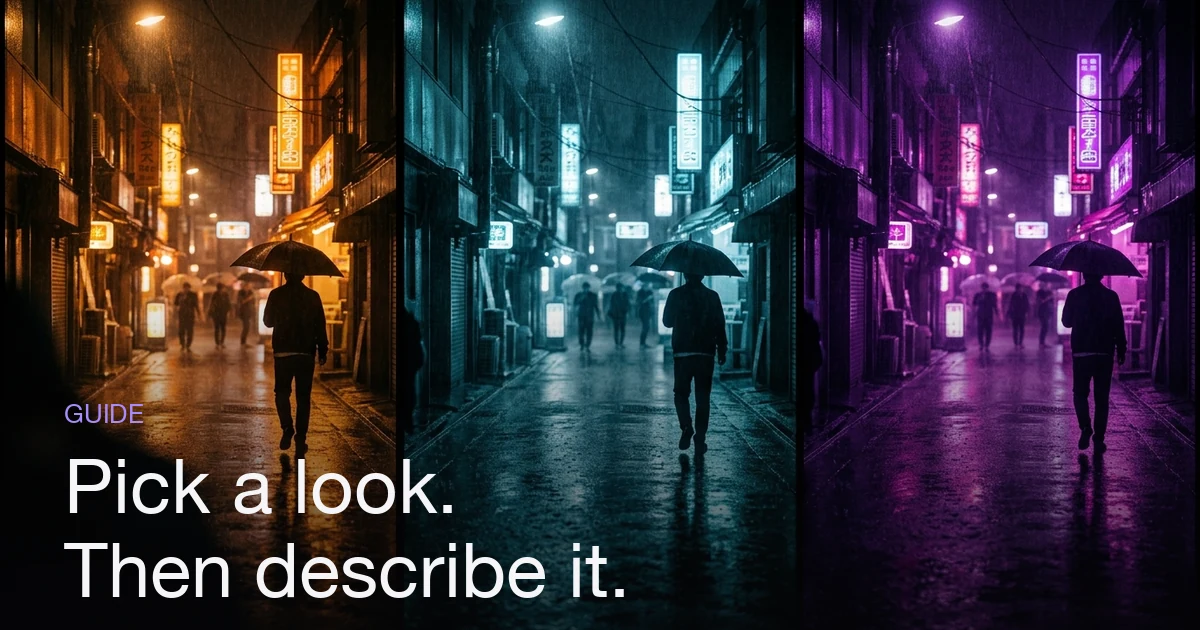
Choose a visual style by fixing five concrete things: one setting, one light source and time of day, two or three colours, one texture, and how the subject is framed. Let the song's tempo and section structure drive pacing and energy; let genre inform the palette without dictating it, because a restrained treatment of an upbeat track is a choice rather than a mistake. Then describe the look in nouns instead of adjectives — "one amber streetlamp, wet tarmac, blue-black shadow, wide frames" gives a generative system something to execute, while "epic" and "vibey" average out into nothing. In Melodious the look is set by the director style you pick and the words in your first message, so that message is where the style is decided.
How do you choose a visual style for an AI music video?
The short answer: Choose a visual style by fixing five concrete things: one setting, one light source and time of day, two or three colours, one texture, and how the subject is framed. Let the song's tempo and section structure drive pacing and energy; let genre inform the palette without dictating it, because a restrained treatment of an upbeat track is a choice rather than a mistake. Then describe the look in nouns instead of adjectives — "one amber streetlamp, wet tarmac, blue-black shadow, wide frames" gives a generative system something to execute, while "epic" and "vibey" average out into nothing. In Melodious the look is set by the director style you pick and the words in your first message, so that message is where the style is decided.
Choosing a style feels like the creative part of the job. It mostly isn't. The creative part is deciding what your video is about; choosing the style is a translation problem — taking a feeling you already have and converting it into instructions specific enough that something other than your own brain could follow them.
That distinction matters more with a generative system than it ever did on a shoot, because a crew asks questions and a model does not. Say "make it moody" to a director of photography and they'll ask which kind of moody, and the follow-up questions do the work. Say it to an image model and it will confidently return the median of every image ever captioned moody. The output isn't wrong. It's just nobody's.
So this guide is about the translation: which decisions constitute a style, how the song should and shouldn't influence them, how to write them down so they execute, and what to do when the look isn't landing. It assumes you already know the shape of the workflow — how to make an AI music video covers that end to end. For the six craft levers behind why certain frames read as filmic, what makes a music video look cinematic covers those. And because a look has to survive contact with a shot list, this pairs directly with how to storyboard a music video, where the style gets applied shot by shot.
Start from the song, not from a moodboard
Moodboards are seductive and slightly dishonest — they collect frames you like, which is not the same as frames that belong to your track. The song is your only fixed constraint, so it goes first. Three things about it genuinely should steer the look:
- Tempo decides how long a shot has to hold. A slow track means fewer, longer shots, and a shot that stays on screen for eight seconds has to be worth looking at for eight seconds — that pushes you towards depth, atmosphere and a frame with something happening in it. A fast track cuts more, so each individual frame carries less weight and simpler, bolder compositions survive better. This is a style decision disguised as a pacing decision.
- Section structure decides where the biggest image goes. Your most ambitious frame belongs at the chorus, and the bridge is where a style is allowed to break — a new location, a colour that hasn't appeared yet, a shift in light. Knowing that in advance stops you spending your best idea on the intro.
- Lyrics supply the nouns. Pull two or three concrete objects or places out of the words: headlights, a payphone, a kitchen at 2am. These are worth more than any genre label, because they're the part of the look nobody else's video will have.
Genre belongs on a shorter leash. It's a useful hypothesis about what viewers expect, and it's worth knowing the expectation mainly so you can decide whether to meet it:
| Genre | The default everyone reaches for | Worth considering instead |
|---|---|---|
| Trap / drill | Night, chrome, low angles, hard flash | Daylight and stillness — the contrast reads as confidence |
| Indie folk | Golden-hour fields, handheld, 16mm grain | One interior, one lamp, near-total darkness around it |
| Synth-pop | Neon grid, purple and cyan, retro chrome | A single colour, held everywhere, with neon as the only accent |
| Ballad | Rain on a window, desaturated, close-ups | Wide and empty — a small figure in a large space |
| House / dance | Club, strobes, crowds, fast cuts | Empty club at 6am, one shaft of light |
Neither column is inherently better. The point is that the left one is where a model drifts on its own if all you give it is a genre — so naming the genre adds nothing, and naming anything else adds a lot.
The five decisions that make up a style
A style isn't a vibe, it's a small set of answers. Five of them cover almost everything, and each one has a vague version that generates nothing and a usable version that generates something.
| Decision | Vague version | Usable version |
|---|---|---|
| Setting | "Urban", "nature", "moody interior" | One named place: a closed petrol station on a coast road |
| Light | "Dramatic lighting", "well lit" | One source, named, with a time: sodium streetlamps at 3am |
| Palette | "Cool tones", "cinematic colours" | Two or three, stated: sodium orange, blue-black, one cold white |
| Texture | "High quality", "film-like" | Rain on glass and faint grain |
| Subject framing | "Focus on the artist" | Figure small in wide frames, seen from behind or in mirrors |
Two rules make this list work harder than its length suggests. One setting, not three — a video that visits a warehouse, a forest and a rooftop has no style, it has locations. And two or three colours, never more — a restricted palette is the single most reliable way to make separate shots feel like one world, and it is free.
The fifth row is the one people skip. Framing is a style choice as much as palette is: a video built from wide shots of a small figure is a different film from one built on tight close-ups, even with identical lighting and colour. Decide it once, up front.
Write it in nouns, not adjectives
Here's the test that resolves most of it: if a word cannot be photographed, it cannot be generated. "Amber streetlamp" can be photographed. "Epic" cannot. Adjectives describe your reaction to a frame; nouns describe the frame.
Adjectives fail predictably. A model resolves a vague word to the centre of everything it has seen described that way, so "cinematic" produces the average cinematic image. Averages are, definitionally, unremarkable. Nouns and stated quantities have no average to collapse into.
| Instead of | Write |
|---|---|
| "Dark and moody" | "One overhead bulb, everything outside its pool of light is black" |
| "Cinematic colours" | "Amber and deep blue only, no greens anywhere" |
| "High energy" | "Handheld, close to the subject, strobe as the only light" |
| "Dreamlike" | "Overexposed daylight, soft focus at the frame edges, no hard shadows" |
| "Cool urban vibe" | "Wet concrete, one neon sign in shot, everything else unlit" |
Then add the line most people never write: what must never appear. "No crowds, no daylight, no other cars" does more work across twelve shots than any positive description, because a look usually dies by accumulation — one extra person here, a sunlit frame there — rather than by a single wrong decision. One prohibition line is the cheapest consistency tool available.
If you want the full one-page version of this, with a fill-in template and a worked example, how to write a brief for your AI music video director is the long form. The compressed version is: five nouns and one prohibition, and you're ahead of most briefs.
Your first message carries the whole look
This is where the practical stakes have changed, and it's worth being precise about it.
Melodious used to interview you before showing you anything — it asked what visual direction you wanted, made you pick a length and a pacing style, wrote a storyboard, and waited. That's gone. Attach a song, type what you want to see, press send, and it writes the storyboard and generates your keyframe images in the same run. It reads your song's tempo and section structure and makes those calls itself. No questions, and nothing to approve before the images exist.
Which means the look now comes almost entirely from the words in that one message. There is no follow-up question to rescue a thin description, and the images are already being made by the time you'd have thought of one. Two consequences worth internalising:
- Press send having decided, not while deciding. The credit cost for the keyframe stage is stated under the composer before you send, because pressing send is the decision to spend. It's a small figure — roughly 8% of what a full 30-second video costs — but it is not nothing, and a message that says "make it cool" spends it on the average.
- The video render still waits for you. Turning those keyframes into video clips is the expensive stage and it has kept its own explicit approval step. Melodious will never start a render because you sent a chat message. So the stills are your review point: get the look right there, where fixing it costs a regeneration.
There's also a control that sits in front of the message itself. From the composer's + menu you can set a director style — six presets (hip-hop video producer, moody cinematic, indie / lo-fi, high-energy performance, surreal / dreamlike, documentary-realist) or a custom brief of your own capped at 200 characters. It shows as a removable chip on the composer and persists on the project.
The 200-character cap is a feature rather than a limit — roughly two sentences, enough for a setting, a light source and a palette, not enough for a paragraph of atmosphere. "Rain-soaked neon alley, single overhead light, one figure, no crowds" fits with room to spare.
How to keep one look across every shot
Style drift is the most common failure in AI video, and it's structural rather than random: each scene is generated from its own prompt. A look you stated once, at the top, gets progressively less influential the further down a twelve-shot list you go. Four things hold it:
- Repeat the palette and light in every scene description. Not "as established above" — actually restate "sodium orange and blue-black, one light source" in each one. Repetition is tedious to write and is what consistency costs.
- Use a director style rather than only a chat message. A style set from the
+menu becomes a standing instruction the director carries on every turn — it's told to thread that aesthetic through the storyboard summary and each shot's image prompt. A line typed into chat is one message in a history that keeps growing. Same words, very different half-life. - Reuse the subject rather than re-describing them. Describing "a woman in a red coat" in five scenes gets you five different women, because each scene is generated from its own text. Save the character once to your assets library and
@mentionit so you're pointing at a fixed reference image instead of a description that drifts — the mechanics are in reusable AI characters. It's a strong steer rather than a guarantee, so make the figure recognisable by wardrobe, silhouette and setting too: a denim jacket and a specific car survive a scene change more dependably than a face does. - Apply the one-world test. Look at the keyframes as a set and ask whether they could come from the same night — not "are they all good", since good shots that disagree read as a compilation. If one frame has a different light direction or a colour that appears nowhere else, that's the one to fix, even if it's the nicest image in the grid.
Aspect ratio belongs here too, since a look composed for wide frames doesn't survive a crop to vertical — decide it up front, and the aspect ratio guide covers planning for both.
When the look isn't landing
The storyboard stays yours after it's written. You can edit any scene's title or prompt, add or delete scenes, regenerate a single keyframe that missed without touching the others, or reply in the composer to steer the whole plan — "make it darker", "lose the daylight scenes", "move the wide shot to the chorus".
Diagnose before you rewrite, because the fix depends on which of three things went wrong.
| What you're seeing | Likely cause | Fix |
|---|---|---|
| Every shot is competent and forgettable | The brief was adjectives | Rewrite the look in nouns and regenerate the keyframes |
| Individual shots are strong, the set doesn't cohere | The look was stated once, not per scene | Restate palette and light in each scene's prompt |
| One frame breaks an otherwise consistent set | Scene-level prompt drift | Regenerate that single keyframe |
| The subject changes between scenes | Described rather than saved | Save the character and reference it in each scene |
| The whole direction is wrong, not the details | Wrong style choice, made early | Change the director style, then regenerate the scenes |
| It matches what you asked for and you don't like it | You specified the wrong look | Change one variable — usually the light source — not all five |
Two mechanics worth knowing before you start pulling levers. Changing the director style applies to later turns and regenerations; it doesn't silently rewrite images you already have, so regenerate the scenes you actually want restyled. And when you hand-edit a single scene's prompt, your text replaces what the director style wrote there — so restate the palette and light inside the edit, or that one scene quietly leaves the world everything else lives in.
Do all of this while you're looking at stills. That's the whole reason the images come first: the render is the expensive stage, and it's still waiting on your click.
Style mistakes that cost you a render
| Mistake | What you get | Do instead |
|---|---|---|
| Adjectives instead of nouns | The average of everything tagged "cinematic" | Name a place, a light source, two colours |
| Letting genre pick the look | The video everyone in your genre already made | Use genre as a hypothesis; take the specifics from your lyrics |
| Three settings in one video | Locations, not a style | One setting, revisited |
| Five or more colours | Nothing feels connected | Two or three, repeated everywhere |
| No prohibition line | Crowds and daylight creep in shot by shot | Write one "never" line and keep it |
| Stating the look only once | Drift by scene four | Repeat palette and light in every scene prompt |
| Fixing the look after rendering | Paying twice for the same decision | Fix it on the keyframes, before you approve the render |
The one that costs most is the last: every problem in this table is cheap while you're looking at images and expensive afterwards.
Choose a look you can repeat
Pick a style you could describe to someone over the phone in fifteen seconds. "Night, one sodium streetlamp, orange and blue-black, rain, the figure always small in frame" passes; "moody, cinematic, kind of nostalgic" doesn't, and the difference is precisely the difference between a video that looks directed and one that looks generated.
The bonus is reuse. Five concrete answers are portable — keep the setting, light, palette, texture and framing rows, swap the song, and the second video visibly belongs to the same release. That's how a body of work starts to look like one. If the whole flow is new to you, how to make an AI music video walks it end to end; when you're ready, bring your track and your five answers to the studio.
Frequently asked questions
How do I choose a visual style for an AI music video?
Fix five things before you write a word of the prompt: one setting, one light source and time of day, two or three colours, one texture, and how the subject is framed. Take the setting and objects from concrete nouns in your lyrics rather than from a genre label, and let the song's tempo and section structure decide pacing. Five specific answers beat any number of mood words, because each one is a decision the model can act on.
Should my song's genre decide the visual style?
Genre is a useful hypothesis and a terrible rule. It tells you what viewers expect — trap gets night, chrome and low angles; folk gets daylight and handheld — which is worth knowing mainly so you can decide whether to meet the expectation or break it. The two things that should genuinely drive the look are tempo, which sets how long each shot can hold, and the lyrics, which supply the specific objects and places nobody else's video will have.
Why does my AI music video look generic?
There are two failure modes and the first is far more common: the prompt was adjectives. Words like cinematic, epic, moody and aesthetic describe a feeling rather than a frame, so the model fills the gap with the average of everything it has seen tagged that way — and the average is generic by definition. Swap each adjective for something photographable: a named place, a single light source, two colours, one texture. The other failure mode is drift, where each shot is fine on its own but the set clearly does not belong to the same video.
How do I describe a visual style so the AI actually produces it?
Use the photograph test: if a word cannot be photographed, it cannot be generated. "One amber sodium lamp, rain on tarmac, deep blue-black shadow, the figure small in a wide frame" is executable. "Epic, moody, cinematic" is not. Add a prohibition line as well — "no crowds, no daylight, no other cars" — because saying what must never appear does more to hold a look across a dozen shots than any positive adjective.
How do I keep the same visual style across every shot?
Repeat the palette and the light source in every scene description, not just once at the top. Each scene is generated from its own prompt, so a look stated only in the opening message thins out as the shot list gets longer. A director style helps here because it is a standing instruction carried on every turn rather than one line in a growing chat history, and reusing a saved character from your assets library keeps the subject steady. Then apply the one-world test: could these frames plausibly come from the same night?
Can I change the style after the storyboard has been generated?
Yes. You can reply in the composer — the chat box you sent your first message from — to steer the whole plan, edit any individual scene's prompt, change the director style, or regenerate a single keyframe that missed without touching the others. Changing the director style applies to later turns and regenerations rather than silently rewriting images you already have, so regenerate the scenes you want restyled. Doing this while you are still looking at stills is the point — the video render is the expensive stage and it still waits for an explicit approval click.
Decide the look before you press send
Set a director style, write the look in nouns, attach your song — and the storyboard and keyframes come back built to it.
Open the studio