Video Brief Template: How to Brief Your AI Music Video Director
A brief for an AI music video director is one page answering five things: the song, the visual style, who or what recurs on screen, what happens across each song section, and the hard rules the video must never break. Write it before you open the app, not while you're typing into a chat box. In Melodious the brief maps onto real controls — a director style (six presets, or a custom brief capped at 200 characters) threads through the storyboard summary and the image prompt behind every shot; saved characters are reused from your assets library as reference images rather than re-described; length, pacing and aspect ratio are chosen before generation starts. The template below is fill-in-the-blank with a worked example underneath. Copy it, spend fifteen minutes on it, and you'll spend far less time regenerating scenes that weren't wrong — just never specified.
What goes in a brief for an AI music video director?
The short answer: A brief for an AI music video director is one page answering five things: the song, the visual style, who or what recurs on screen, what happens across each song section, and the hard rules the video must never break. Write it before you open the app, not while you're typing into a chat box. In Melodious the brief maps onto real controls — a director style (six presets, or a custom brief capped at 200 characters) threads through the storyboard summary and the image prompt behind every shot; saved characters are reused from your assets library as reference images rather than re-described; length, pacing and aspect ratio are chosen before generation starts. The template below is fill-in-the-blank with a worked example underneath. Copy it, spend fifteen minutes on it, and you'll spend far less time regenerating scenes that weren't wrong — just never specified.
Almost every disappointing AI music video traces back to the same moment: someone typed "make it cinematic and moody" into a chat box and pressed enter. The model did exactly that. It produced a competent video about nothing in particular, because nothing in particular was asked for.
A human director would have interrogated you first. What city? What time of night? Who's in it? What are we never showing? An AI director doesn't push back that hard, so the interrogation has to happen on paper, before you start. That's all a brief is — the questions a director would have asked, answered in advance. If you're new to the end-to-end process, how to make an AI music video covers the full flow; this post is the fifteen minutes that happen before step one.
In a hurry? Jump straight to the template — the worked example is directly underneath it.
Prepare the song before you write a word of the brief
The brief describes what happens over a song, so the song has to be settled first.
- Export a real audio file. MP3, WAV, M4A, FLAC, OGG and AAC all upload, up to 50 MB. A 3-minute WAV clears that comfortably; a 10-minute uncompressed session bounce won't.
- Upload the mix you'd release, not the rough. Tempo, section boundaries and lyrics are read off the file you give it. A phone-recorded demo produces a fuzzier structural map, and the storyboard is built on that map.
- Decide which part of the song this video is. Length tiers run 30 seconds, 60 seconds, 2 minutes, and the full song up to six minutes — which tiers you're offered depends on how long the track is, and everything past the 30-second clip needs a paid plan. If you're generating 60 seconds of a 4-minute track, know which 60 seconds before you start — usually a chorus into a bridge, not the intro.
- If you want lyrics on screen, check the vocal sits up in the mix. Lyric videos are generated by transcribing and aligning the actual vocal, so a buried vocal is harder to align than a present one.
- Save the track to your library once. A saved song is analyzed a single time and reused instantly afterwards, so second and third videos on the same track skip that wait entirely.
The video brief template
Copy this whole block. Every line is either a blank or a choice between named options.
# MUSIC VIDEO BRIEF — [song title]

## 1. THE SONG
Track:              [title + the exact section, if you're cutting it down]
Length:             [30s / 60s / 2 min / full song]
Feel:               [tempo and genre in five words]
Lyric images:       [two or three concrete nouns lifted from the lyrics]
Faces on screen:    [yes / no — there's no lip-sync, so plan around it]

## 2. DIRECTOR STYLE
Preset:             [hip-hop / moody cinematic / indie lo-fi /
                     high-energy performance / surreal / documentary-realist]
Custom (200 chars): [only if no preset fits]

## 3. THE WORLD
Setting:            [one place, named specifically]
Light:              [source + time of day]
Palette:            [two or three colours, no more]
Texture:            [film grain / clean digital / haze / rain / neon]

## 4. WHAT RECURS
Main figure:        [who or what, one line]
Saved as:           [@name of the saved character asset]
Appears in:         [which song sections]
Recurring object:   [the one prop or place that comes back]

## 5. THE ARC, SECTION BY SECTION
Intro:              [what we see first]
Verse:              [the everyday state]
Chorus:             [the biggest image in the video]
Bridge:             [what changes]
Outro:              [how it resolves]

## 6. HARD RULES
Always:             [what must be in every scene]
Never:              [what must never appear]
Pacing:             [slow (8s shots) / balanced (4-8s) / fast (4-6s)]

## 7. WHERE IT GOES
Master aspect:      [16:9]
Also need:          [9:16 / 1:1 — centre-cropped, so keep action centred]
Lyrics on screen:   [yes / no]
Intro + outro cards:[yes / no]
A worked example
Same template, filled in for a mid-tempo synth track. Note how little of it is adjectives.
# MUSIC VIDEO BRIEF — "Long Way Back"

## 1. THE SONG
Track:              Long Way Back — second chorus through the bridge
Length:             60s
Feel:               mid-tempo synth-pop, 104 BPM, melancholy but moving
Lyric images:       headlights, a payphone, the coast road
Faces on screen:    no — driver seen from behind or in mirrors only

## 2. DIRECTOR STYLE
Preset:             moody cinematic
Custom (200 chars): —

## 3. THE WORLD
Setting:            a coastal motorway at 3am, one closed petrol station
Light:              sodium streetlamps and headlights; no daylight anywhere
Palette:            sodium orange, deep blue-black, one cold white
Texture:            light rain on glass, faint grain

## 4. WHAT RECURS
Main figure:        a lone driver, mid-30s, denim jacket
Saved as:           @night-driver
Appears in:         verse, chorus, outro
Recurring object:   the same silver car, always shot low

## 5. THE ARC, SECTION BY SECTION
Intro:              empty road, no car yet, rain on tarmac
Verse:              interior, hands on the wheel, wipers
Chorus:             wide crane over the coast road, car small in frame
Bridge:             the petrol station — first time the car stops
Outro:              tail lights leaving frame, road empty again

## 6. HARD RULES
Always:             it is night, and it is raining
Never:              other people, other cars, any interior that isn't the car
Pacing:             balanced (4-8s)

## 7. WHERE IT GOES
Master aspect:      16:9
Also need:          9:16 for Reels — keep the car centred
Lyrics on screen:   no
Intro + outro cards:yes
The "never" row is doing more work than any adjective in the document. "No other people, no other cars" is the line that keeps a lonely video lonely across twelve scenes.
What each field actually changes
The brief isn't a mood board. Most rows correspond to something concrete in the pipeline.
| Brief row | What it controls |
|---|---|
| Director style | A style directive threaded through the storyboard summary and the image prompt behind every shot — palette, lighting, camera, mood, cut pacing |
| Custom brief | Same slot as a preset, in your words, capped at 200 characters |
| Setting / light / palette | The visual detail that lands in each scene's image prompt |
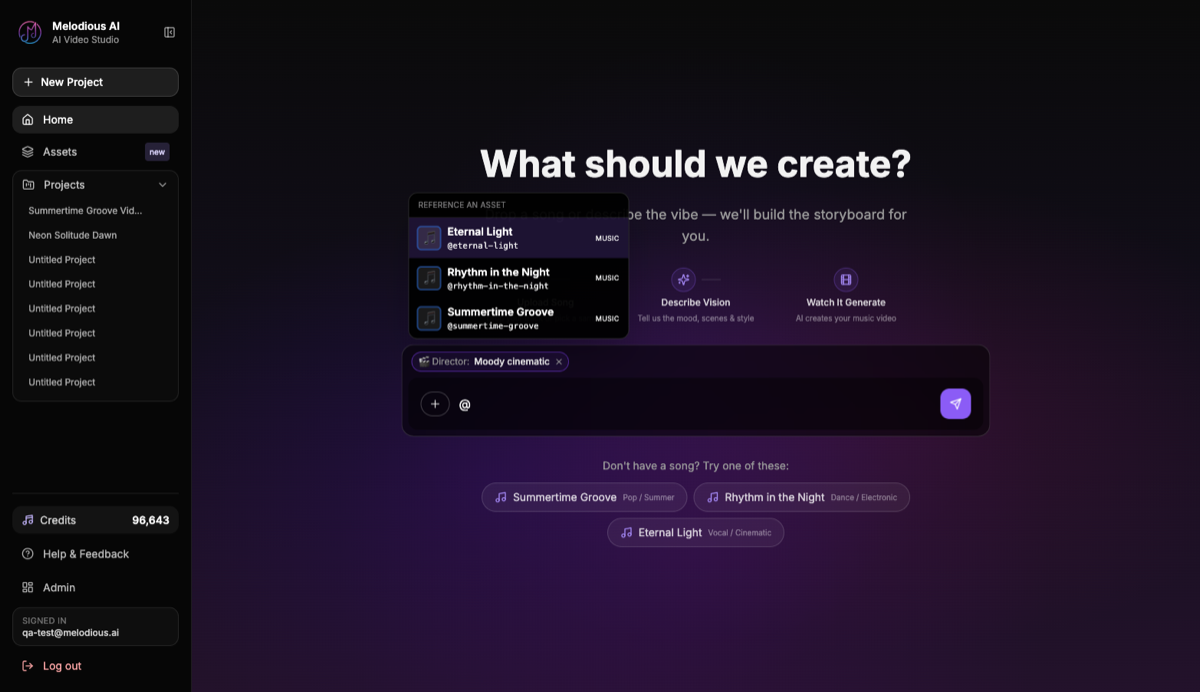
| Saved character | A reference image from your assets library — @mention it in the composer to condition the keyframes, or drop it on one scene card to redo just that scene |
| Section-by-section arc | The scene descriptions in the storyboard, mapped to real detected sections of your track |
| Pacing | Shot length: slow gives 8-second shots, balanced 4–8, fast 4–6 |
| Length | How many shots there are to fill |
| Aspect | A 16:9 master, with 9:16 and 1:1 centre-cropped from it in the same run |
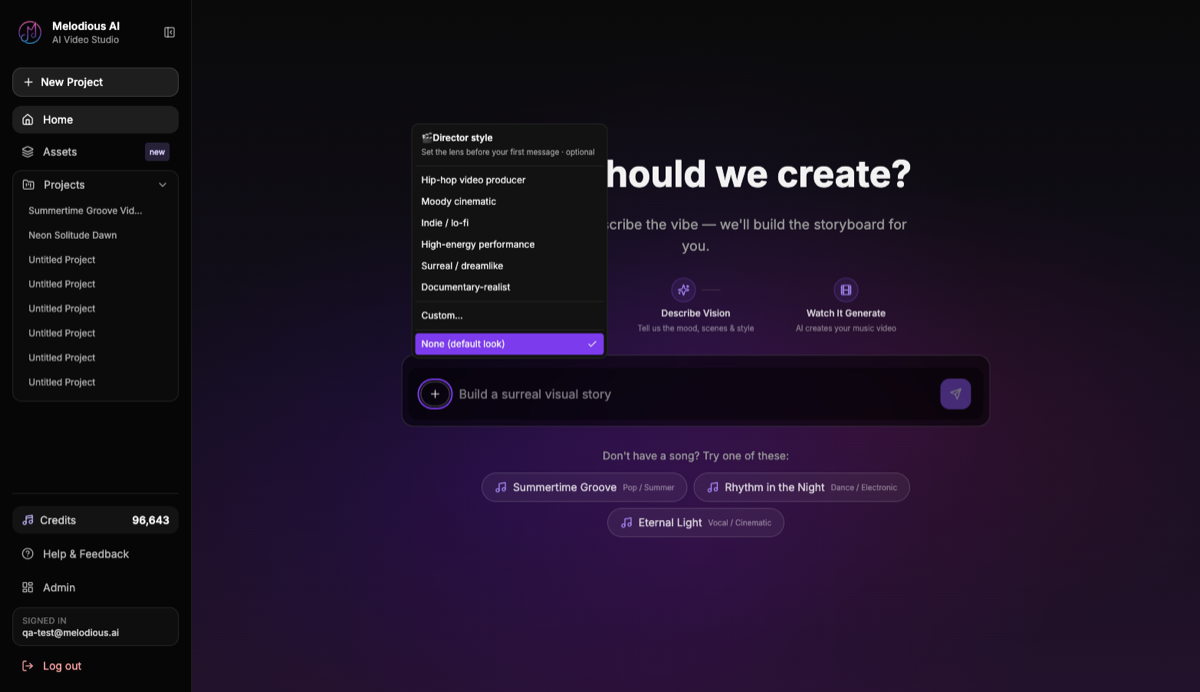
Two rows deserve a note. The custom brief is capped at 200 characters, which is a feature — it forces you to spend the space on nouns rather than adjectives. "Rain-soaked neon alley, single overhead light, one figure, no crowds" beats a paragraph of atmosphere every time.
And the saved character row is worth filling in even though the tooling is still catching up. Describing "a woman in a red coat" in five separate scenes gets you five different women, because each scene is generated from its own text. Saving her once gives you a fixed reference image to point at instead of a description that drifts, which gets you far closer than re-typing — but holding one performer genuinely identical across every scene isn't reliable yet, so treat it as a strong steer rather than a guarantee. The practical hedge is to make the figure recognisable by silhouette, wardrobe and setting as well as by face: a denim jacket and a specific car survive a scene change more dependably than a jawline does. The mechanics are in our guide to reusable AI characters, and the wording itself in how to write an AI character brief that holds.
Where briefs go wrong
Most briefs fail the same handful of ways: adjectives where nouns belong, no prohibition line, and shot-level detail written before the look is agreed.
| Mistake | What you get | Fix |
|---|---|---|
| Adjectives instead of nouns | "Cinematic, emotional, epic" — a generic video | Name the place, the light, the object |
| No "never" line | Crowds, daylight, extra characters drifting in | Write one prohibition; it's the highest-leverage row |
| Describing shots, not the world | You've written a shot list before you've agreed the look | Edit shots on the storyboard, where they belong |
| A character described, not saved | A different face every scene | Save one reference image and reuse it — and design the figure to read from wardrobe and silhouette too |
| Length and aspect written in prose | The pickers still decide | Set them in the pickers before generating |
| Planning around a singer's face | There's no lip-sync yet | Wides, silhouettes, backs of heads, hands |
That last one is a real constraint, not a stylistic preference. Plan the performance shots as atmosphere rather than as a close-up delivering the hook.
From brief to storyboard
The brief isn't the plan — it's the input to the plan. Paste the filled-in template into your first message, set the director style, then let the storyboard get drafted against your song's actual structure. Note what you don't need: a separate storyboard template. The shot breakdown is generated from your brief and your song's detected sections, so the blank grid you'd normally fill in by hand arrives already populated, and your job shifts from drawing it to correcting it. What comes back is editable: every scene has a title and an image prompt you can rewrite, and you can delete or add scenes. Nothing renders until you explicitly approve the storyboard, so all of that editing costs you nothing.
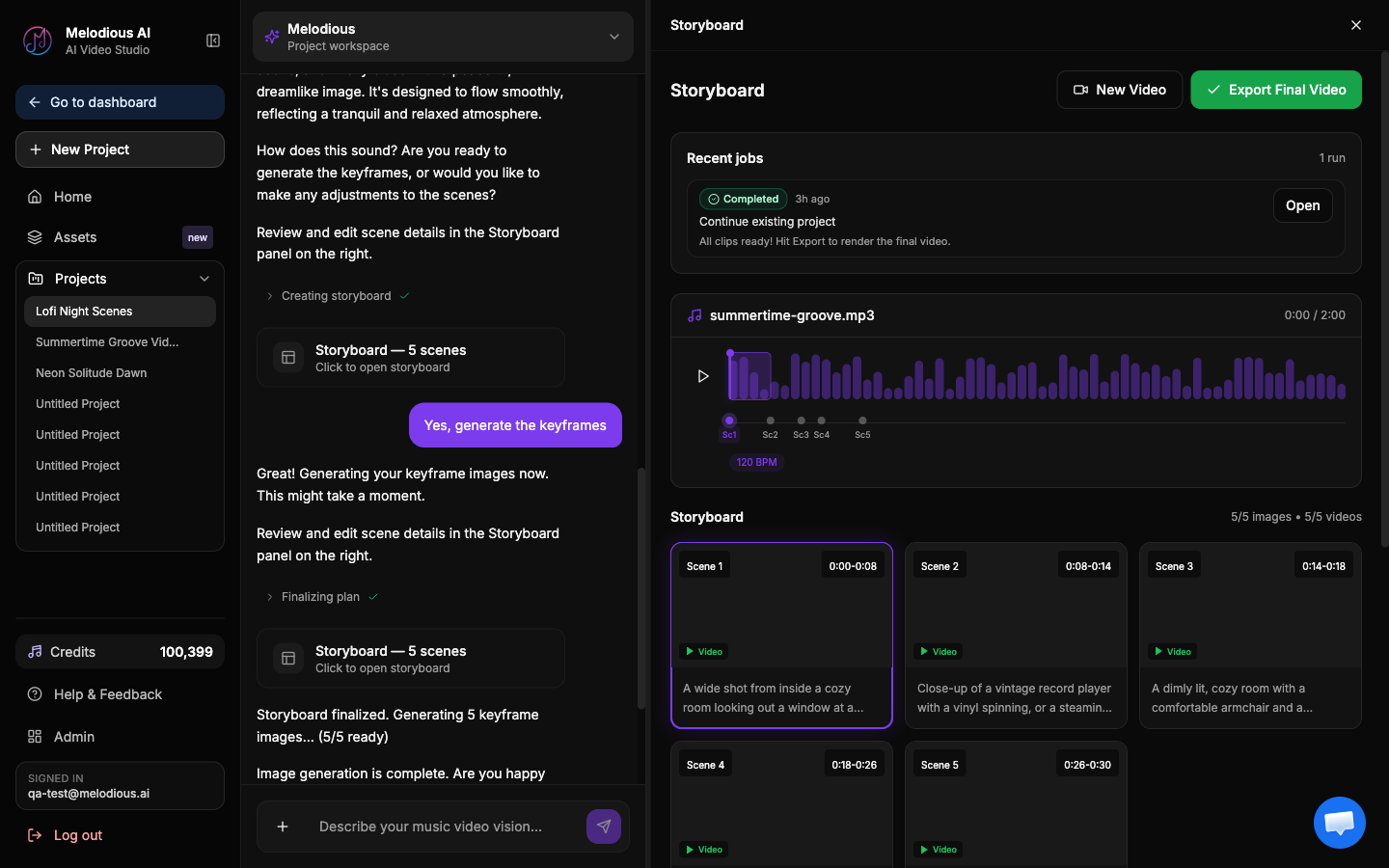
Read the storyboard against your brief, row by row. Is it night in every scene? Is the car in the chorus? Is anyone in frame who shouldn't be? Fixing it there costs a text edit. Fixing it after generating costs a re-render.
If the storyboard step is new to you, how to storyboard a music video covers mapping shots to song sections, and how to make a music video for your song walks the whole flow end to end. A brief is written for the director; a music video treatment is written for everyone else who has to say yes to the idea. When you're ready to run it, open the studio with your track and your brief.
Frequently asked questions
What is a video brief?
A video brief is a short written document that fixes the creative decisions before production starts — the goal, the look, who is on screen, and what must and must not appear. In advertising it's written by a client for an agency. For a music video you're writing it for yourself, or for an AI director, and the job is the same: turn a feeling you have into instructions someone else could follow without asking you a question.
How is a brief for an AI director different from a normal video brief?
Two differences. First, an AI director has no shared context with you — it can't infer that 'like the last one' means the warehouse video, so every recurring element has to be named or saved as a reusable asset. Second, the brief's fields map to actual controls rather than to a conversation: a director style, a pacing setting, a length tier, an aspect ratio. Standard agency briefs also carry budget, deliverable deadlines and approval chains, which don't apply here.
How long should a music video brief be?
One page. If it runs longer you're writing a shot list, which is a different document that comes after — the storyboard is where shot-level detail belongs. Two constraints keep it honest: a custom director brief in Melodious is capped at 200 characters, and the world section should name one setting, one light source, and no more than three colours. Anything you can't fit is probably a preference rather than a requirement.
Do I need a brief if the AI generates the storyboard for me?
The AI drafts the storyboard either way — the brief decides whether it drafts yours or a plausible generic one. Melodious plans shots against the real structure of your uploaded track, so the timing is right regardless, but the imagery comes from what you described. A vague vision produces a competent video about nothing in particular, and you find out after generating.
What should I leave out of the brief?
Camera-lens jargon, shot-by-shot direction, and anything that duplicates a setting. Naming a lens or a focal length rarely survives into the image; naming a light source and a palette does. Skip shot-level detail because you'll edit that on the storyboard, where each scene has an editable description and image prompt. And don't write the length or aspect ratio in prose — those are pickers, and the picker is what the render obeys.
Can I reuse the same brief for a second video?
Yes, and it's the main reason to write one down. Keep the director style, world and recurring-character rows, swap the song and the section-by-section arc, and you get a second video that visibly belongs to the same release. Saved characters carry across projects from your assets library, so you point at the same reference image every time instead of re-typing a description that drifts.
You've written the brief. Now run it.
Bring your song and the brief you just filled in. The director drafts a storyboard you can edit before a single frame renders.
Open the studio