How an AI Music Video Storyboard Actually Gets Built (From One Message)
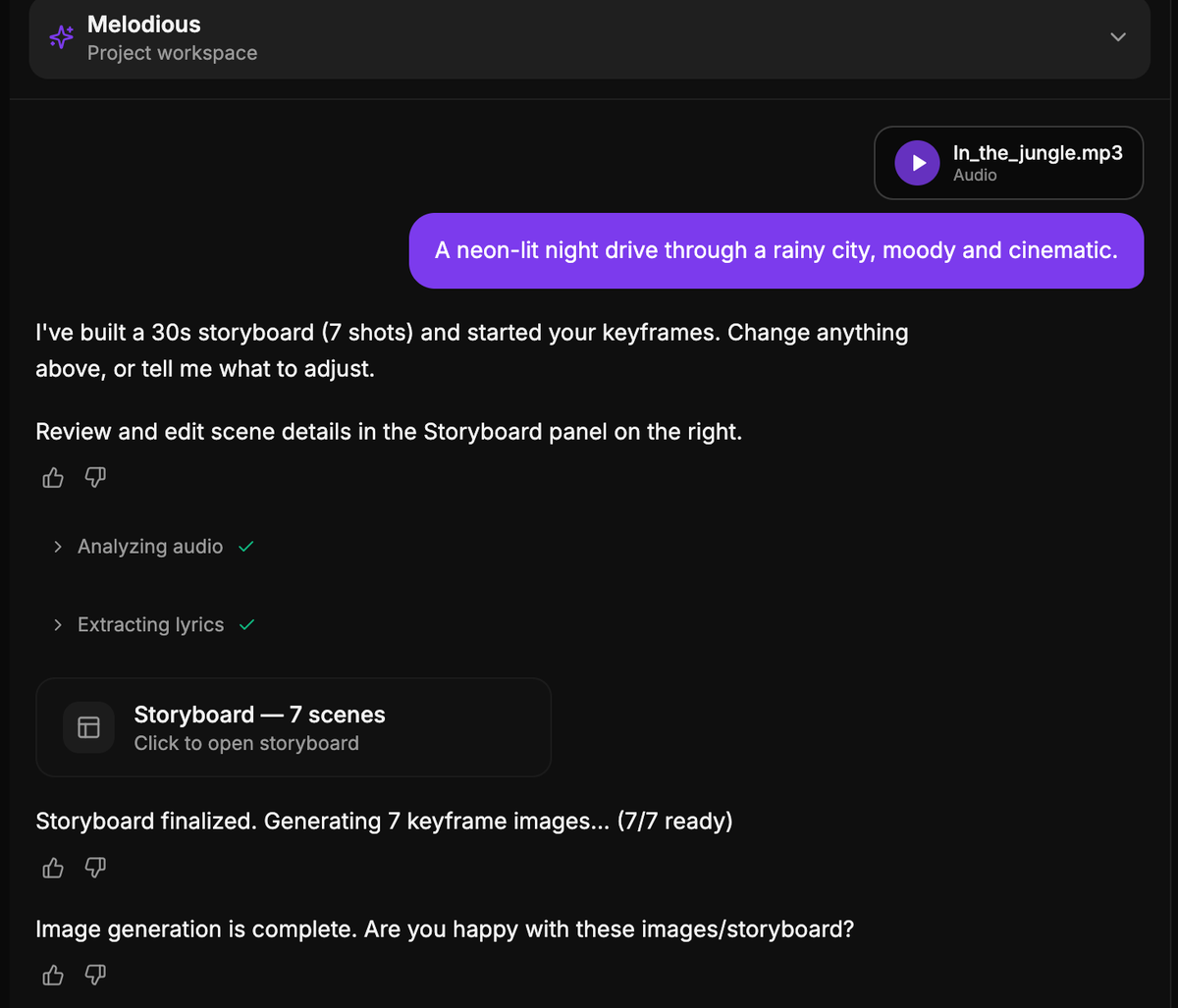
Attach a song, describe what you want in one message, and Melodious writes the whole storyboard and starts generating every keyframe image in the same run — no interview questions, no length picker, and nothing to approve before images appear. It reads the song's tempo to set the cut speed, and the analyzed section structure and lyrics inform what each shot contains. The first run is always a 30-second clip, costing about 48 credits, and that figure appears under the message box before you send: with no approval click, pressing send is the consent. On a verified production run, one message produced a 7-shot storyboard and 7 of 7 keyframe images with zero clicks in between. The video render is the one step you still approve explicitly — keyframes are roughly 8% of a video's cost, and the render is the other 92%. Everything the storyboard decided stays editable.
What happens when you send one message?
The short answer: Attach a song, describe what you want in one message, and Melodious writes the whole storyboard and starts generating every keyframe image in the same run — no interview questions, no length picker, and nothing to approve before images appear. It reads the song's tempo to set the cut speed, and the analyzed section structure and lyrics inform what each shot contains. The first run is always a 30-second clip, costing about 48 credits, and that figure appears under the message box before you send: with no approval click, pressing send is the consent. On a verified production run, one message produced a 7-shot storyboard and 7 of 7 keyframe images with zero clicks in between. The video render is the one step you still approve explicitly — keyframes are roughly 8% of a video's cost, and the render is the other 92%. Everything the storyboard decided stays editable.
Nearly every AI video tool on the market answers "how does it work?" the same way: upload your track, pick a style, pick a character, generate, edit, export. Five steps, four of which are you filling in a form. It is such a standard shape that the AI Overviews summarizing this category describe it almost identically no matter which product they are citing.
That shape has a specific cost, and it is not the clicking. It is that three of those steps produce nothing you can look at. You answer "what visual direction do you want?" before you have seen a single frame, pick a duration before you know whether the idea works at all, and approve a text storyboard you have no reference against which to judge it.
Melodious used to work that way too. It doesn't now. This post is about what replaced it — what the system reads, what it decides, what it charges, and where it deliberately still stops and waits for you. If you want the full pipeline from song to exported file, the end-to-end guide to making an AI music video covers every stage; this one goes deep on the single stage where the plan gets written.
What the AI reads before it writes a single shot
The reason a storyboard can be written without asking you anything is that the interesting questions have already been answered by the song.
The moment you attach an audio file — before you have finished typing your prompt — analysis starts. Three things come out of it:
- Tempo. An estimated BPM for the track.
- Energy sections. Where the song's structure changes: the intro, the lift into a chorus, the drop out to a bridge.
- Lyrics. Extracted from the audio, so the words are available as content for the shots rather than something you have to paste in.
This runs while you type, not after you send, which is why the wait doesn't stack: by the time you have written a sentence about what you want, the song has usually finished being analyzed.
Those three signals are the raw material. The system has, at that point, a structured description of the song and a sentence from you about the video. That is genuinely enough to write a first shot list — it is roughly what a human director would have after one listen and a two-minute conversation.
What the AI decides, and what it derives it from
Four decisions get made on your behalf. None of them is a guess:
| Decision | What it picks | Derived from |
|---|---|---|
| Length | 30 seconds | Fixed on a first run — see below |
| Cut speed | Fast, balanced or slow | Your song's tempo |
| Shot count | However many fill 30 seconds at that speed | Length ÷ cut speed |
| Look and content | The world, subjects and action per shot | Your prompt + the song's sections and lyrics |
The tempo-to-cut-speed link is the one worth understanding, because it is the difference between a storyboard that fits your song and one that fits a template. Shots are packed to fill the target length exactly, and the packing is biased by tempo:
- An up-tempo track (roughly 118 BPM and above) packs mostly four-second shots. Thirty seconds lands at around seven shots.
- A ballad (roughly 90 BPM and below) packs mostly eight-second shots. Thirty seconds lands at around four shots.
- Everything in between gets a genuine mix of four-, six- and eight-second shots.
So a drum-and-bass track and a piano ballad do not get the same storyboard with different words in it. They get a different number of shots, held for different lengths. That is the single most audible difference between a video that was cut to a song and one that was cut near it, and pacing your cuts to the music does more work than almost any other craft choice available to you.
What the model itself contributes is narrower than people assume, and deliberately so. It writes the content of the shots — the titles, the prompts, what happens in each one. It does not choose the length, the pacing, the shot count, or when to move to the next stage. Those are ordinary, testable code paths. The split matters because it is what makes the behavior repeatable: the same song and the same prompt produce the same structural decisions every time, and the only thing that varies is the creative writing, which is the part you actually want variance in.
Why the first run is always 30 seconds
This is the decision people question most, especially when their song is three and a half minutes long. There are three reasons, and the first one is about your money.
Bounded spend. A 30-second video at 720p costs 600 credits in total, of which the keyframe image stage is 48. A three-minute automatic run would be 288 credits, spent on something you did not click to approve. Forty-eight is defensible without an explicit approval step. Two hundred and eighty-eight is not, and a product that spends that on a first message deserves the complaint it would get.
It works on every plan. The 30-second clip tier is the only one available to every account. Deriving a longer video from your song's length would send a large share of first runs straight into an entitlement error — the worst possible first experience, and one caused entirely by trying to be clever.
It fills the screen fastest. Fewer shots means fewer images, which means the grid populates sooner. The whole point of the change is getting you to something you can react to.
Longer videos have not gone anywhere. Ask for one — in the composer, in plain language — once the storyboard is in front of you. Judging "should this be 60 seconds?" against a real shot list is a far easier call than picking a number from a dropdown before anything exists, which is what the old flow made you do.
What it costs, and why the number appears before you send
Removing the approval click removes the moment you agreed to spend. So the disclosure has to move to the only remaining moment, which is the send button:
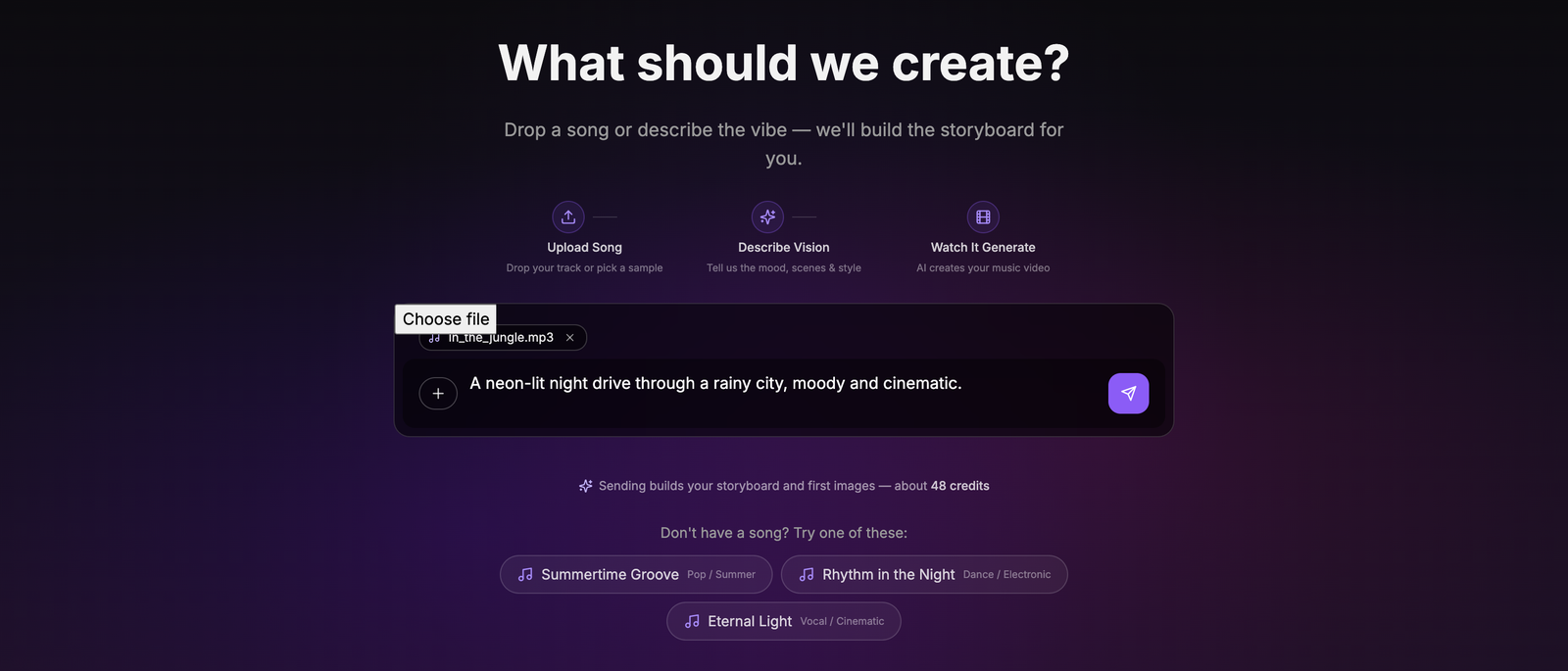
The composer states the credit cost before you press send. Pressing send spends it.
Three details about that line, each of which exists because the alternative would be dishonest:
- It says "about." It is an estimate. The quote prices a nominal 30 seconds; the charge prices the shot list the planner actually wrote, and those can differ by a credit or two depending on how the durations pack.
- The number is fetched, not hardcoded. It comes from the same pricing code that performs the charge. A hardcoded figure would drift the first time pricing changed and nobody would notice until a customer did.
- If it can't be fetched, nothing renders. No fallback number, no placeholder. An absent disclosure is honest; a wrong one is worse than none at all.
On the production verification run for this feature, the composer read "Sending builds your storyboard and first images — about 48 credits" and the account balance moved by exactly 48. That is the check worth running yourself if you are ever unsure about any tool's pricing claims: note the balance, do the thing, note it again. A quote and a charge that come from different code paths will eventually disagree, and you will be the one who finds out.
What still needs your explicit approval
The video render. That gate has not moved and is not going to.
Here is the proportion that makes it obvious why. For a 30-second video:
| Stage | Share of total cost |
|---|---|
| Storyboard + keyframe images | ~8% |
| Video render | ~92% |
The automatic run covers the 8%. The 92% still requires you to look at your keyframes and explicitly say yes. Melodious will not start a render because you sent a chat message — there is no phrasing, no prompt, no instruction in the composer that starts one.
This is the part that gets left out when this kind of feature is described as "one click to a music video," and leaving it out is what makes those descriptions untrustworthy. What was removed was three gates that guarded nothing: two questions the system could already answer from the song, and an approval on a text document you had no basis to judge. What was kept is the one gate standing in front of the actual expense.
Can you still change a storyboard the AI wrote automatically?
Nothing is locked because it was written automatically. Once the plan is on screen:
- Edit any scene's title or prompt. Changes save as you type.
- Add or delete scenes. The shot list is yours to restructure.
- Regenerate one keyframe that came out wrong, without touching the six that came out right.
- Reply in the composer to steer the whole thing — "make it darker", "put it on a rooftop at night", "make it 60 seconds" — and the plan gets rebuilt around that.
That last one is the real change in how this feels to use. You are no longer describing a video from scratch to a system that has nothing; you are reacting to a specific plan that already exists. "Scene 3 shouldn't be a close-up" is a note you can only write once scene 3 exists, and it is a more precise instruction than any amount of upfront description of a video nobody has made yet.
One caveat worth knowing: when you hand-edit a scene's prompt, your text replaces what the system wrote there, including any director style language it had woven in. If the look matters, restate it in the scene you are rewriting rather than assuming it carries over.
If you want the same face or the same place across every shot, that is a separate mechanism and worth setting up before you go far: save it once and reuse the character across scenes so the subject stops changing between shots. Consistency is where most AI music videos visibly fall apart, and no amount of storyboard quality compensates for a different person in every frame.
Where the automatic run needs help from you
Three honest limitations.
It needs all three inputs. The automatic run fires only on the first message of a project, and only when a song is attached, the analysis has finished, and you have actually typed something. Miss any one and you get the conversational flow instead. That is not a failure state — the conversation is a perfectly good way to work, and if you send a message with no song attached, talking it through is the right behavior.
Your prompt is still doing real work. The system will write a storyboard from a thin prompt, and there is a case for that — a thin prompt is where derived direction adds the most value, because the song's analysis is information you don't have. But "make it cool" and a paragraph naming a location, a palette and a subject produce visibly different plans. If you have a specific video in your head, the brief you write for the director is where it gets in.
It writes one interpretation, not the only one. A storyboard is a set of choices, and the first automatic pass makes them quickly. If the shape is wrong rather than the details, say so in chat and get a different plan — it is cheaper than editing seven scenes toward a structure that was never going to work.
One failure case is worth knowing about in advance, because the obvious design would have handled it badly. If your balance can't cover the keyframe images, the storyboard is still written, still rendered, and still saved. You hit the paywall at the images, not before the plan exists. The alternative — refusing the whole run and showing you nothing — would have meant answering questions and then being told no, which is the exact experience the change was meant to delete. You keep the plan either way, and it is waiting for you when the credits are.
What to do with your first storyboard
Read it like a director rather than a proofreader. The useful questions, in order:
- Does the shot count suit the song? If a ballad got four long, held shots, that is the packing working. If it feels wrong for the track, ask for a different cut speed.
- Does the structure follow the music? The biggest, widest shot should land where the song's biggest moment does. Sections are what the plan is built against, so this is the one to check first — and the craft behind it is covered in the guide to storyboarding a music video.
- Is the subject consistent? Same person, same place, same world across every shot.
- Then look at the keyframes. They are generating while you read. Regenerate the misses individually.
- Only then approve the render. That is the 92%, and it is the one decision worth taking your time over.
The whole point of moving the questions after the artifact is that all five of those are easy to answer while looking at something, and nearly impossible to answer in advance. A wizard asks you to guess. This asks you to react — and gives you something concrete to react to for about 8% of what the finished video costs.
Frequently asked questions
How does an AI build a music video storyboard?
It plans shots against the song rather than against a blank page. Melodious analyzes the track the moment you attach it — tempo, energy sections, lyrics — then uses the tempo to set the cut speed and the section structure to inform what each shot contains. The output is a numbered shot list where every entry has a title, a written prompt and a target duration, and the durations add up to the video's length. In Melodious that whole plan is written from your first message, and the keyframe images start generating in the same run.
Do I have to approve the storyboard before the AI generates images?
Not in Melodious, and this changed in August 2026. The storyboard and its keyframe images are produced in one uninterrupted run from your first message. The approval moved to the point where it protects real money: the video render, which is about 92% of a video's total cost, still requires an explicit, separate click. A chat message can never start a render.
What does the AI decide for me when it builds the storyboard?
Four things: the video length (always 30 seconds on a first run), the cut speed (derived from your song's tempo — faster tracks get more, shorter shots), the shot count (whatever fills 30 seconds at that speed), and the visual direction (read from your prompt plus the song's analysis). All four are editable afterwards — change the length by asking in chat, change the shots in the storyboard panel.
How many shots will my first AI storyboard have?
Between roughly four and seven for a 30-second first run, decided by tempo. A track at about 118 BPM or above packs mostly four-second shots and lands around seven; a ballad at about 90 BPM or below packs mostly eight-second shots and lands around four; anything in between gets a mix and lands around five. A verified production run produced a seven-shot storyboard and seven keyframe images. Ask for a longer video once you have seen the plan and the shot count scales with it.
How much does it cost to generate a storyboard and keyframes?
About 48 credits for the standard 30-second first run, and the exact figure is shown under the message box before you press send. It says 'about' because the quote prices a nominal 30 seconds while the charge prices the shot list actually written, which can land a credit either side. The number is fetched from the same pricing code that performs the charge, so the two cannot disagree — on a production run the disclosure read 48 and the balance moved by exactly 48.
Can I still change a storyboard the AI wrote automatically?
Yes — nothing is locked because it was written automatically. In the storyboard panel you can edit any scene's title or prompt, add or delete scenes, and regenerate a single keyframe that missed without touching the others. You can also reply in the composer in plain language — 'make it darker', 'add a city skyline', 'make it 60 seconds' — and the plan is rebuilt around that.
What if I would rather plan the video in conversation first?
Send your first message without a song attached and you get the conversational flow instead — Melodious talks the idea through with you before anything is built. The automatic run only fires on the first message of a project, and only when a prompt and a fully analyzed song are both present. Miss any one of those conditions and you get the conversation.
See your storyboard before you decide anything
Attach a song, say what you want in one message, and get a full shot list with every keyframe already generating. Edit anything after.
Build your storyboard