Suno Song → Music Video
An AI music video generator for your Suno songs
You finished the track. Export it, upload it here, and an AI director storyboards a music video against the song's real structure — cuts where the song changes, not a loop with your audio laid over the top.
First video $19 one-time · independent product, not affiliated with Suno
A Suno AI music video generator turns the song you finished in Suno into a video. Melodious does this from the audio itself: you download your track from Suno, upload the file, and an AI director analyses it — sections, tempo, vocal — then storyboards the video against the song's real structure, so the picture changes where the song changes. You describe the look you want in plain language, edit the storyboard, then approve it and every scene is generated and rendered in sync with your audio. If the song has lyrics, the words can be timed to the vocal and put on screen. Melodious is an independent product with no Suno integration — the connection is simply the audio file you export, which is why the same workflow fits a track from any source. Melodious is paid up front rather than free to try: the First Video is $19 one-time and buys a finished 30-second video at 720p with no watermark and one regeneration, and you still see and approve the full storyboard before any video is generated. A full-length release video is $97 one-time, with the $19 credited toward it for 14 days, and Pro plans start at $147/month.
How to make a Suno music video
Four steps, starting from the file you already have.
- 1
Export the track from Suno
Download your finished song as an audio file — MP3 or WAV. That download is the whole handoff; there is no account to connect and nothing to authorise.
- 2
Upload it and describe the look
Drop the file in and tell the AI director what you want in plain language — a mood, a place, a reference, a character. A sentence or two is enough to start.
- 3
Review the storyboard
Melodious analyses the track and proposes a scene-by-scene plan built on its actual sections. Edit scenes, rewrite a prompt, or regenerate one you don't like — all before anything renders.
- 4
Approve and render
Approve the storyboard and each scene is generated and rendered in sync with your audio. Download the finished video in the aspect ratio you're publishing to.
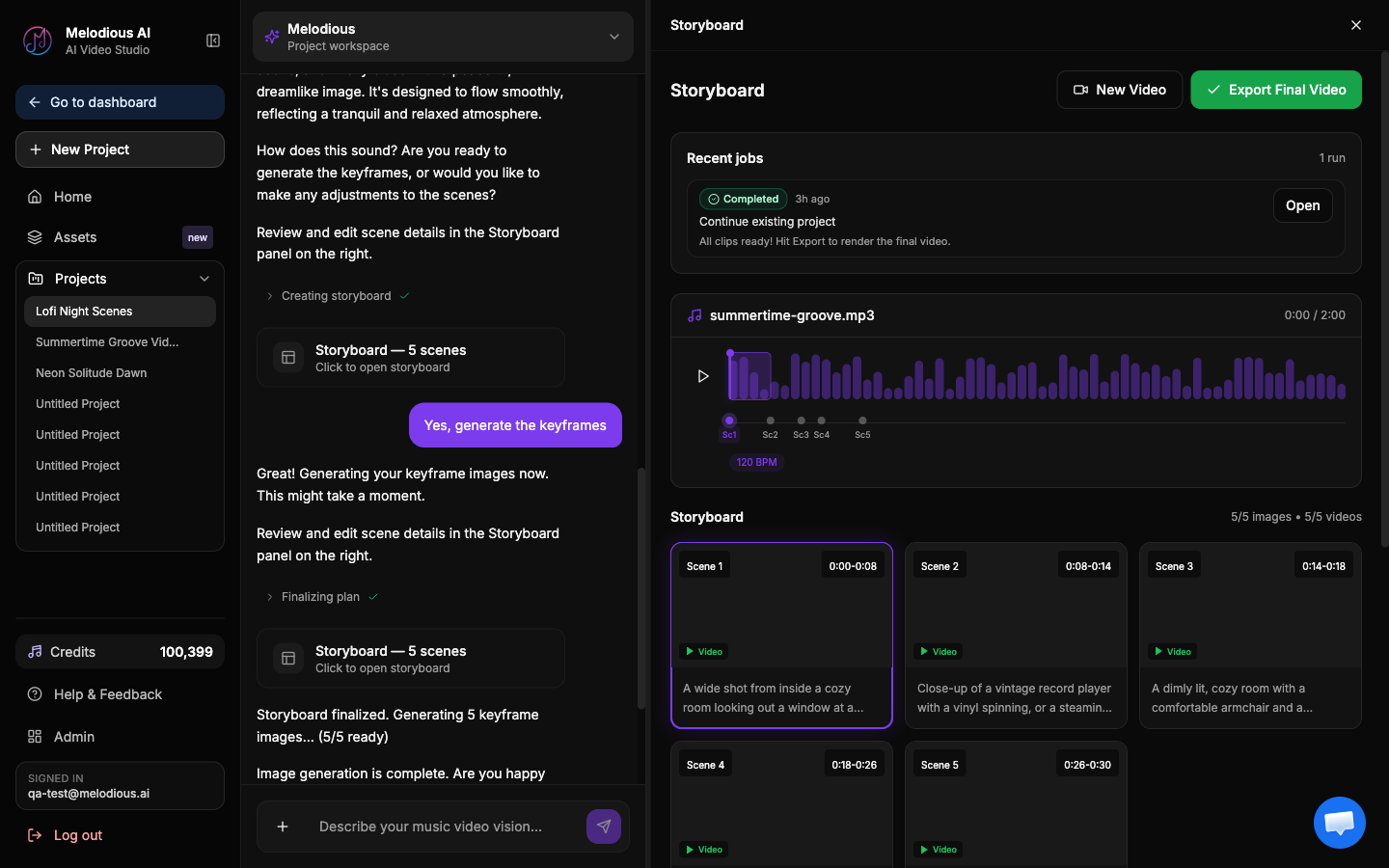
How Melodious works with Suno (plainly)
Melodious is an independent product. It is not affiliated with, endorsed by, or integrated with Suno, and there is no API between the two — no plugin, no connected account, no import button. If a tool tells you otherwise, check what it actually does.
What connects them is the export. Suno gives you a finished audio file; a finished audio file is exactly what Melodious takes as input. So the workflow is: download from Suno, upload here. That is the entire integration, and it is also why nothing here is Suno-specific — a bounce from your DAW, a studio master or a track from another AI music tool all go through the same door.
The two products are complementary rather than competing. Suno solves the song. Melodious solves the thing you need the moment the song is done and you want to put it somewhere people will actually watch it.
Why the video is built from the song, not dropped on top of it
Most quick routes from audio to video give you one visual that runs for the whole track — a waveform, a looping background, an animated still. A Suno music video made that way is watchable for about fifteen seconds, because nothing on screen knows the chorus arrived.
Melodious analyses the track first — sections, tempo, vocal — and plans the shots against that. The result is a video whose cuts fall where the song changes, which is the difference between a music video made for your track and a template your track was poured into. You see the plan as a storyboard and can change it before anything is rendered, so the expensive step only ever runs on something you have already approved.
Two things carry across scenes rather than resetting each time: a director style you choose once, and reusable characters and assets you can drop into a shot with an @-mention, so the same performer or location can appear throughout instead of a different stranger in every cut.
If your Suno song has lyrics
You can put the words on screen, and the timing comes from the audio rather than a guess. Melodious isolates the vocal from your mix, takes word-level timings from that isolated vocal, and aligns them onto the lyrics you have confirmed — so a line lands where it is actually sung. You get to correct the extracted lyrics first, which matters more than it sounds: a mis-heard word caught here never reaches the final file.
Three caption styles ship today — Karaoke Highlight, which fills each word as it is sung; Line Reveal, which fades lines in over the visuals; and Bold Center, a large centred word-pop built for social. Lyric captions are not restricted to the Pro plan.
Want the lyric version? See how the AI lyric video maker works.What you get
| Input | Your finished song exported from Suno as an audio file (MP3 or WAV) |
|---|---|
| Output | An AI-generated music video synced to your track, ready to download |
| How the scenes are planned | Against the analysed song — its sections, tempo and vocal |
| Storyboard editing | Yes — edit, add or delete scenes and rewrite prompts before rendering |
| Lyrics on screen | Optional — three caption styles, timed from the isolated vocal, not Pro-gated |
| Aspect ratios | 16:9 (landscape), 9:16 (vertical), 1:1 (square) |
| Resolutions | HD 720p · Full HD 1080p · 4K |
| Price | First Video $19 one-time (30 seconds, 720p, no watermark, one regeneration); Full Video $97; Pro from $147/month |
| Approval before rendering | You see and approve the full storyboard before any video is generated |
| Skills needed | None — no timeline, no keyframing |
| Rights | Full commercial rights to your videos on a paid plan |
Melodious is not affiliated with Suno. Suno is a trademark of its owner and is referenced here only to describe the workflow — the audio file you export is the only connection between the two products.
Common questions
Is Melodious connected to Suno?
No. Melodious is an independent product, not affiliated with or endorsed by Suno, and there is no API connection, plugin or account link between the two. The handoff is a file: you download your finished song from Suno the way you normally would, then upload that audio here. So if you came looking for a Suno AI video generator, the honest description is a separate tool that takes the export — nothing about the workflow is Suno-specific, which is also why it works with a track from a DAW bounce or a studio recording.
What do I export from Suno?
The finished audio. Download your track from Suno as an audio file — MP3 or WAV both work — and upload it. Melodious analyses the file you give it, so a clean full-length export is the right thing to bring rather than a screen recording or a preview clip.
How is this different from a Suno video generator that just adds a background?
A moving background is the same clip regardless of what the song does. Melodious plans a scene-by-scene storyboard against the analysed track, so a chorus can be shot differently from the verse before it, and you can see and edit that plan before anything is rendered. The output is a music video with cuts that fall where the song changes, not a loop with your audio laid over it.
Can I put the Suno lyrics on screen?
Yes — that is the lyric video path, and it is not restricted to the Pro plan. Melodious isolates the vocal from your mix, derives word-level timings from that isolated vocal and aligns them onto the lyrics you have confirmed, so a line lands where it is actually sung. You correct the extracted lyrics before anything renders. Three caption styles are available: Karaoke Highlight, Line Reveal and Bold Center.
Is it free to try?
No, and the pricing is deliberately plain about it: nothing runs before you pay, so signing up on its own gets you nothing. The way in is the First Video at $19 one-time — a finished 30-second music video from your Suno track, 720p, no watermark, with one regeneration included if the first cut is not right. You still control what gets made: the AI director shows you the complete scene-by-scene storyboard and you approve it before any video is generated, so the $19 is not a blind purchase. If you want the full-length release version, that is $97 one-time and the $19 is credited toward it in full for 14 days. Pro plans start at $147/month for volume.
What sizes and resolutions can I export?
Music videos export in 16:9 for YouTube, 9:16 for Reels, Shorts and TikTok, and 1:1 for feeds, at HD 720p, Full HD 1080p or 4K. Pick the placement you are publishing to and export for it.
Who owns the video, and what about the song?
On a paid plan you get full commercial rights to the music videos you generate, and your finished videos stay yours. The rights to the song itself are governed by the terms you accepted when you made it — that is between you and Suno, and worth reading before a commercial release, since those terms differ by plan.
Do I need editing experience?
No. There is no timeline and no keyframing. You upload the audio, describe the look in a sentence or two, review the storyboard the AI director proposes — editing scenes or rewriting individual prompts if you want to — and approve it.
Product
AI music video generator
How the whole thing works, whatever the song was made in.
Tool
Audio to video AI
The same workflow for a track from anywhere — a DAW bounce, a studio master, any audio file.
Guide
How to make a music video for your song
The craft side — what to brief, what to cut, and what makes a first attempt look amateur.
Explainer
What is an AI music video generator?
How these tools actually work, and how they differ from a visualizer.
Guide
Keeping the same character across scenes
Reusable characters and assets, and how @-mentions hold a performer together across a video.
The song is done. Give it something to watch.
Export your track, upload it, and approve the storyboard before a single frame is rendered. $19 for your first video.
Already have an account? Go to your dashboard