Audio → Music Video
Turn any audio into a video with AI
Upload your audio and an AI director storyboards a cinematic music video synced to your track — no editing skills, no footage, no timeline. Approve the storyboard before anything renders.
Plans from $19/month · finished in minutes
To turn audio into a video with AI, upload your audio file to Melodious. An AI director analyzes the track, builds a scene-by-scene storyboard from a short description of your vision, then generates and renders each scene into a finished music video synced to your audio. You approve the storyboard before any video is generated, so you see exactly what will be made first. Plans start at $19/month: Starter is 750 credits a month, about 35 seconds of HD video at 720p with no watermark, and Artist ($97/month, 5,200 credits) covers a full song of about four minutes. Cancel anytime. The result is a downloadable music video — not a static file conversion — that you can publish to YouTube, TikTok, Instagram, or anywhere else.
How to turn audio into a music video
Three steps from an audio file to a finished, downloadable video.
- 1
Upload your audio
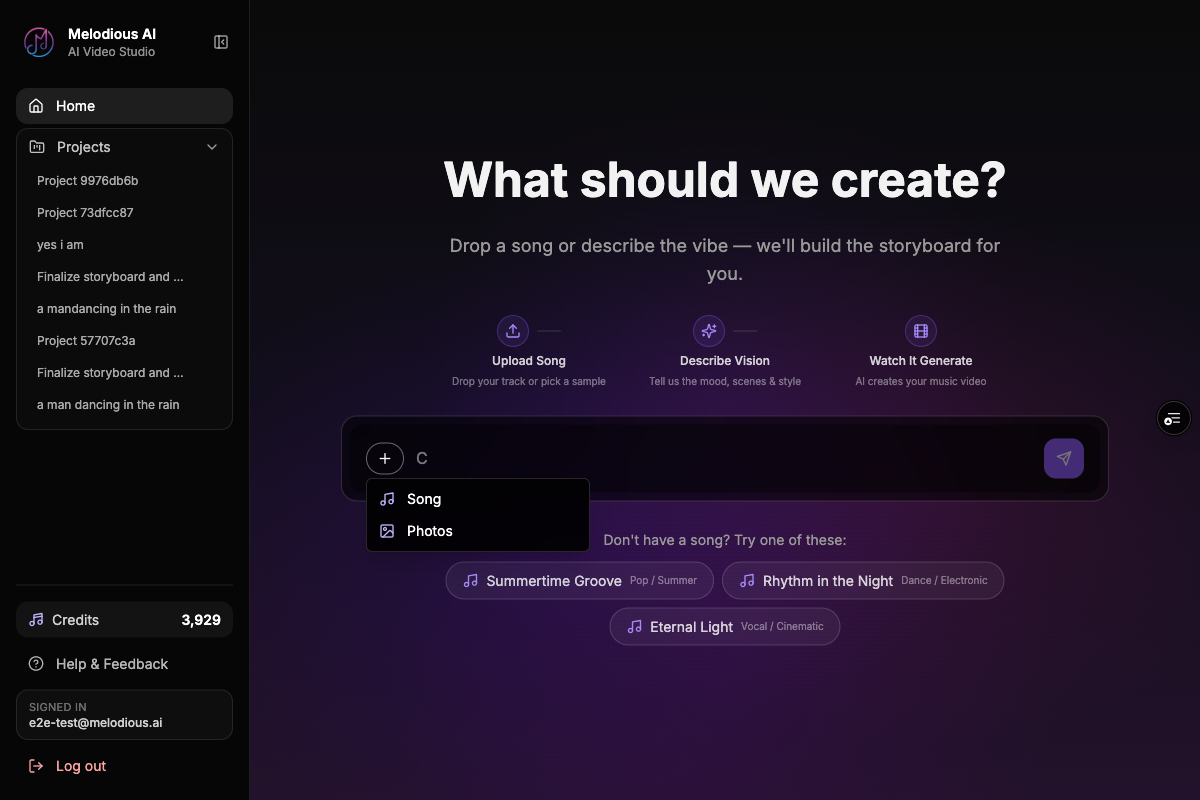
Drop in an audio file — MP3 or WAV — or use one of the three demo songs already in your library. Melodious analyzes the track so the video can be timed to it.
- 2
The AI director storyboards
Describe your vision in a sentence or two. The AI director proposes a scene-by-scene storyboard you can review and refine before anything renders.
- 3
Get your synced video
Approve the storyboard and Melodious generates and renders each scene, synced to your audio. Download the finished video and publish it anywhere.
What you get
| Input | An audio file — MP3 or WAV (your full song) |
|---|---|
| Output | An AI-generated music video synced to your audio, ready to download |
| Aspect ratios | 16:9 (landscape), 9:16 (vertical), and 1:1 (square) |
| Resolutions | HD 720p · Full HD 1080p · 4K |
| Skills needed | None — describe your vision in plain language |
| Price | Starter $19/month (750 credits ≈ 35 s of HD video); Artist $97/month (5,200 credits ≈ 4 min); Label $147/month (8,500 credits ≈ 7 min); cancel anytime |
| Approval before rendering | You see and approve the full storyboard before any video is generated |
| Rights | Full commercial rights on a paid plan; your videos stay yours |
Melodious builds an original AI music video from your audio — it is not a file-format converter.
Common questions
Is this just an audio-to-video file converter?
No. Melodious doesn't wrap your audio in a black screen or a waveform and call it a video. It builds an original, AI-generated music video — a storyboard of cinematic scenes that an AI director generates, animates, and syncs to your audio. The output is a real music video, not a static file conversion.
What kind of audio can I turn into a video?
Any full song or audio track in a common format like MP3 or WAV. You upload the audio, Melodious analyzes it, and an AI director builds a video timed to it. It works for finished tracks you're about to release as well as demos.
What does it cost?
The brief is free, and new accounts get a free 30-second storyboard, so you see the shots before you pay; rendering the video takes a plan. Plans are monthly and you can cancel anytime. Starter is $19/month for 750 credits — about 35 seconds of HD video, 720p, no watermark. You still approve the scene-by-scene storyboard before any video is generated, so you know what you're getting before it's made. Artist is $97/month for 5,200 credits, enough for a full-length release video of about four minutes, and Label is $147/month for 8,500 credits (about seven minutes).
How long does it take?
Attach your song, describe what you want in one message, and the AI director writes the storyboard and starts your first keyframe images straight away — there is nothing to approve before that point. You review the storyboard and the stills, adjusting anything you want, and the video render is the one step you approve explicitly. Most short songs finish in a handful of minutes; longer tracks take longer because more scenes are rendered.
Do I own the video I create?
Yes. On a paid plan you get full commercial rights to the music videos you generate from your audio — download them, distribute them, and use them with your release. Your finished videos stay yours.
Where can I publish the finished video?
Anywhere you'd publish a music video — YouTube, TikTok, Instagram Reels, or your own site. Melodious can export in 16:9, 9:16, and 1:1 so the same audio fits landscape, vertical, and square placements.
Turn your audio into a music video
Upload your audio, approve the storyboard, and get a finished video back. Plans from $19/month.
Start free with your songAlready have an account? Go to your dashboard