AI Lyric Video Maker
Lyric videos where the words actually land on the beat
Most AI lyric tools ask a language model to guess when each line happens. Melodious isolates your vocal and takes the timing from the audio itself — then puts the words over AI-generated scenes built from your song's real structure.
First video $19 one-time · lyric captions aren't Pro-only
An AI lyric video maker turns your song into a video with the words on screen, timed to the vocal. Melodious does this by isolating the vocal from your mix, taking word-level timings from the audio itself, and aligning them onto your lyrics — so a line lands where it is actually sung rather than where a language model estimated. You correct the extracted lyrics before anything renders, then pick one of three caption styles: Karaoke Highlight, where each word fills as it is sung; Line Reveal, where lines fade in over the visuals; or Bold Center, a large centred word-pop built for social. The scenes underneath are AI-generated against your song's real structure, so the visuals change where the song changes. Lyric captions are not restricted to the Pro plan. Melodious is paid from the start rather than free to try: the First Video is $19 one-time and buys a finished 30-second video at 720p with no watermark and one regeneration included, and you still review and approve the whole storyboard yourself before a single scene is rendered. A full-length release video is $97, and the $19 is credited toward it in full for 14 days; Pro plans start at $147/month.
How to make an AI lyric video
Four steps from a finished track to a lyric video you can publish.
- 1
Attach your song
Bring your finished mix. Melodious analyses the track once — its sections, tempo and vocal — so both the timing and the visuals can be built against the real structure of the song.
- 2
Correct the lyrics
The extracted lyrics are shown to you before anything renders. Fix a mis-heard word here and it never reaches the final file — the step most tools leave until after the export, when it is too late.
- 3
Choose a caption style
Karaoke Highlight sweeps each word as it is sung. Line Reveal fades lines in over the visuals. Bold Center is a large centred word-pop for social feeds.
- 4
Approve and render
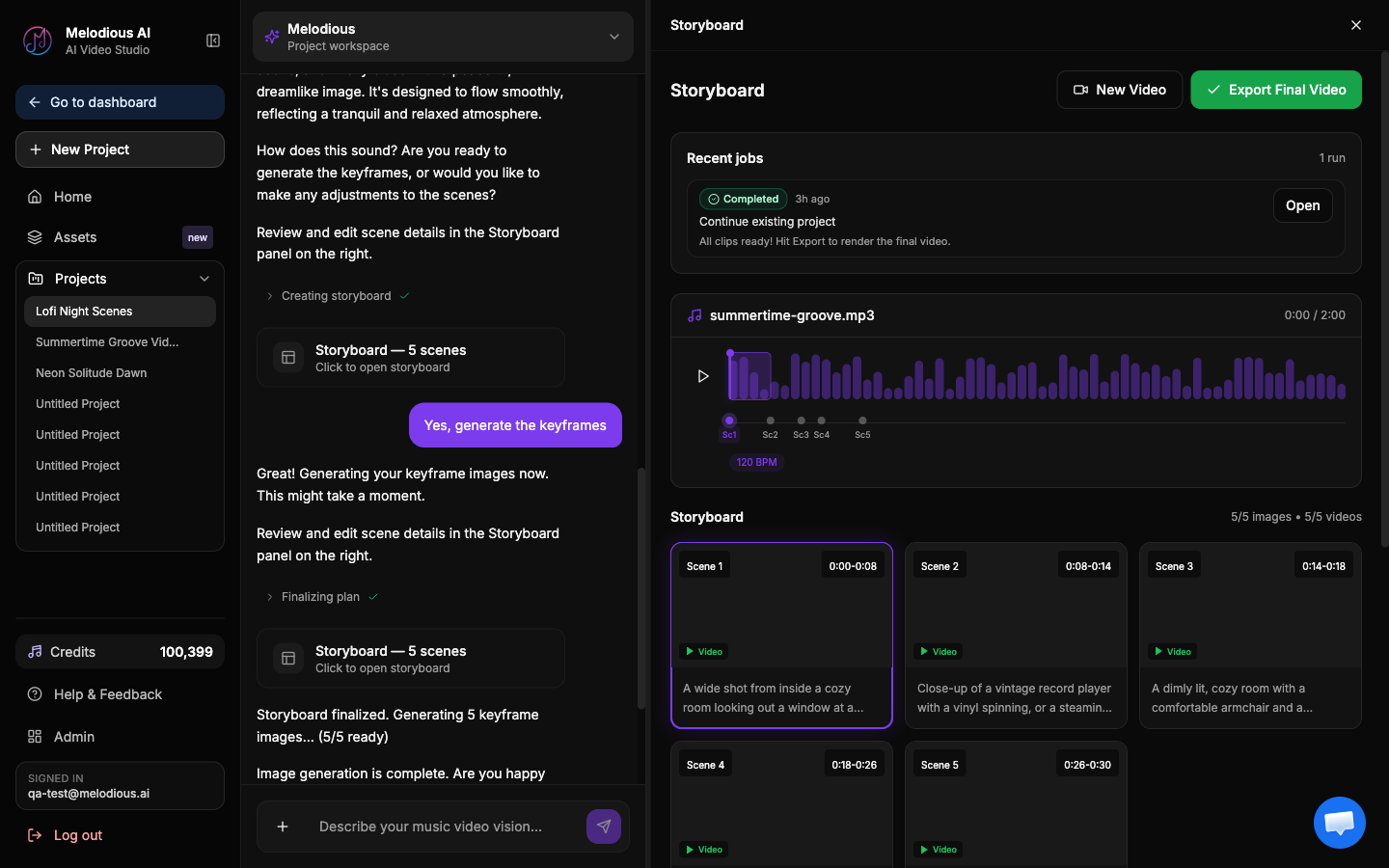
Review the storyboard — you can edit scenes and rewrite prompts — then approve it. The words are aligned to the vocal and burned over the finished scenes.
Why timing is the whole game
A lyric video with the words a beat late reads as broken, even to viewers who couldn't tell you why. It is the one defect nobody forgives, and it is where the shortcut most tools take shows up.
Asking a language model to estimate when each line is sung is cheap and it drifts — worst on exactly the passages where drift is most visible, like a dense rap verse or a busy bridge. Melodious takes a longer route on purpose: separate the vocal from the mix, derive word-level timings from that isolated vocal, then align them onto the lyrics you confirmed. Every render is scored against an independent transcript of the audio afterwards, as a check that the captions match what was actually sung.
The visuals get the same treatment. Because the track is analysed for its sections, the scene changes fall where the song changes instead of on an arbitrary timer — which is the difference between a video built around your song and a template your song was dropped into.
What you get
| Input | Your finished song, plus the lyrics (extracted for you, corrected by you) |
|---|---|
| Output | A lyric video — word-synced captions over AI-generated scenes |
| Caption styles | Karaoke Highlight · Line Reveal · Bold Center |
| How timing is derived | From the isolated vocal in your audio, aligned to your confirmed lyrics |
| Lyric editing | Yes — you correct the extracted lyrics before anything renders |
| Storyboard editing | Yes — edit, add or delete scenes and rewrite prompts before rendering |
| Pro required for captions | No — lyric captions aren't Pro-gated |
| Price | First Video $19 one-time (30 seconds, 720p, no watermark, one regeneration); Full Video $97; Pro from $147/month |
| Skills needed | None — no timeline, no keyframing |
Built for your own music. Melodious generates original scenes for your track — it is not a template library.
Frequently asked questions
How is the timing worked out?
From the audio, not from a guess. Melodious isolates the vocal from your mix, derives word-level timings from that isolated vocal, and force-aligns them onto the lyrics you have confirmed. This matters because the common approach — asking a language model when each line happens — drifts, and drift is the one thing viewers notice immediately in a lyric video. Every render is also self-scored against an independent transcript of the audio as a check on sync quality.
What if the AI mis-hears a word in my song?
You fix it before it renders. The extracted lyrics are shown to you to correct first, so a mis-heard word gets caught by you rather than baked into the final file. This is the step most tools skip, and it is why their mistakes are only discoverable after the export.
What caption styles are available?
Three. Karaoke Highlight sweeps each word as it is sung, the classic sing-along treatment. Line Reveal fades lines in over the visuals, understated and cinematic. Bold Center is a large centred word-pop designed for social feeds.
What is behind the words — a template or a background?
AI-generated scenes, not a template or a looping background. Melodious analyses your track once and plans the visuals against its real structure, so the verse and the chorus look different because the song changes there, not at random. You can review and edit the storyboard before anything is rendered.
Do I need editing skills or a timeline?
No. There is no keyframing and no timeline. You attach your song, describe the look you want in plain language, correct the lyrics, choose a caption style, and approve the storyboard. The alternative — timing every line by hand in After Effects — is what this replaces.
Do I need the Pro plan for lyric captions?
No. Lyric captions are not Pro-gated. The plan you choose affects length, resolution and how many videos you make, not whether you can put the words on screen.
Can I try it before paying?
No — there is no free tier, and an account on its own gets you nothing. Melodious charges before anything runs, which is the honest trade for a tool where every step costs real generation time. The entry price is the First Video at $19 one-time: a finished 30-second lyric video, 720p, no watermark, with one regeneration included. You are not paying blind — you correct the extracted lyrics and approve the full scene-by-scene storyboard before any video is generated. A full-length release video is $97 one-time and the $19 comes off it in full for 14 days, and Pro plans start at $147/month.
Can I use it on a song I do not own?
It is built for your own music. Uploading a commercial track you do not hold the rights to is a copyright problem on any platform you publish to, regardless of the tool that made the video.
Guide
How to make a lyric video
The craft behind it — timing, legibility, and the mistakes that ruin most first attempts.
Product
AI music video generator
The whole thing: song in, scene-by-scene storyboard out, same character in every shot.
Tool
Audio to video AI
Want scenes without the words on screen? Turn any audio into an AI music video.
Put your words on screen, on the beat
Attach your song, correct the lyrics, pick a caption style. The timing comes from your vocal, not from a guess.