Choose Your Film Look: 35 mm, 90s Tape or Clean
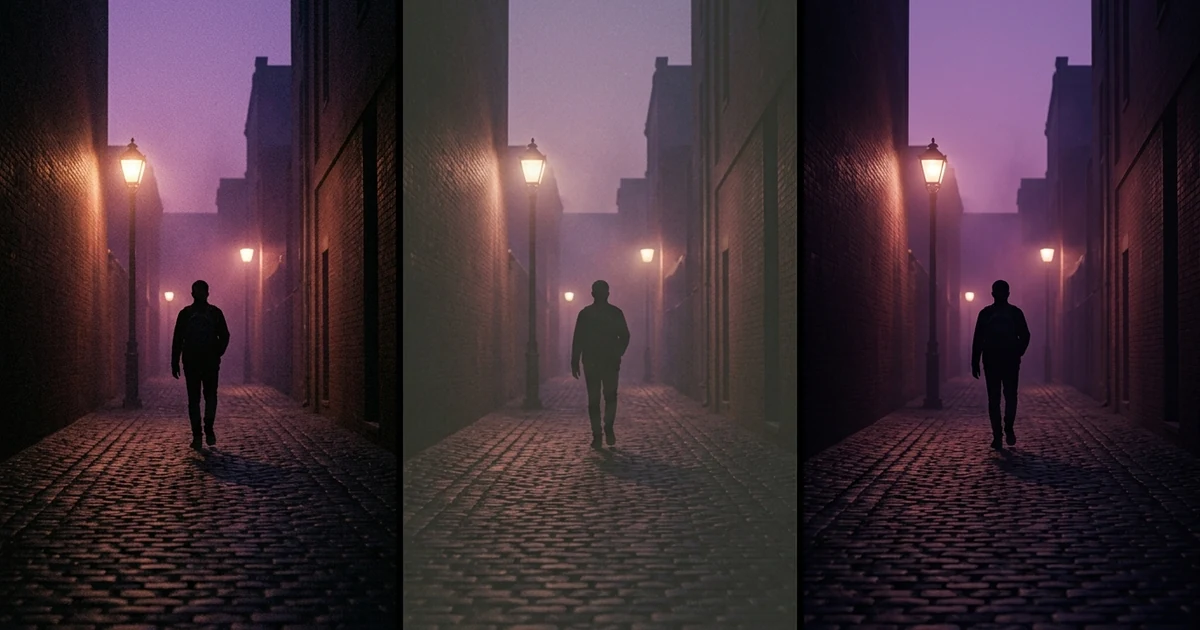
Melodious lets you choose the film look of your finished video: 35 mm film (soft grain, natural colour), 90s tape (VHS texture) or Clean (no grain). The picker sits on the Brief page with a real example of each, and again on the render screen before you pay. Changing the look is free. The look is added when the video renders, so your storyboard stills and the rough cut show without it, and a video you already rendered keeps its look until you render it again.
Your first 30-second storyboard is free. Plans from $19/month.
Which film look should you choose for a music video?
The short answer: Melodious lets you choose the film look of your finished video: 35 mm film (soft grain, natural colour), 90s tape (VHS texture) or Clean (no grain). The picker sits on the Brief page with a real example of each, and again on the render screen before you pay. Changing the look is free. The look is added when the video renders, so your storyboard stills and the rough cut show without it, and a video you already rendered keeps its look until you render it again.
That is the whole feature. The rest of this post is the part that helps you pick: what each look is for, how Melodious chooses a starting point, and the one thing that catches people out, which is when the look appears.
What are the three looks?
35 mm film is the default. For photographed looks, each keyframe is described the way a cinematographer would: 35 mm motion-picture film, fine grain, soft halation on highlights and natural skin texture, rather than the words 'crisp HD' that give a still a glossy AI sheen. A 90s tape video's keyframes are described as camcorder footage instead, and animated looks skip film language altogether. The finished video gets a matching finish: subtle grain, lifted blacks, a warm grade, light halation and a slight vignette. It suits most performance and story videos, and it is the look to pick when you are unsure.
90s tape is the VHS look: soft detail, colour bleeding sideways, moving noise and washed-out tape colour with a slight magenta cast. It is for songs where the era is the point: a throwback, a camcorder diary, a deliberately lo-fi feel.
Clean applies no finish at all. It suits animated and illustrated videos, where film grain on a cartoon looks like a mistake, and it suits anyone who wants a crisp, modern image.
When do you see the look?
At render time, not before. The look is part of the video render, so the storyboard stills and the rough cut show without it. That can surprise you: you pick 90s tape, open the storyboard and see clean frames.
Use the examples on the Brief page to judge the look instead. Each swatch is one of our own keyframes put through the same filters the render uses, so it shows what your video gets rather than an illustration of the idea. The render screen asks again before you pay, which is the last point to change your mind for free.
The rough cut says this itself: it is labelled a stills preview, with motion and your film look arriving when you render. The review step before a render is the place to check everything else about the video.
How does Melodious choose a starting look?
It picks one from what you wrote, and tells you why.
- Mention the 80s, 90s or 2000s in your brief and 90s tape is picked for you. The page shows the reason, so it never looks arbitrary.
- Describe an animated or illustrated look and it starts on Clean, so a cartoon gets no film grain.
- Otherwise, 35 mm film is the default.
All three are suggestions. Click another look and it changes, with no charge.
What does it cost?
Nothing. Changing the look is free and uses no credits, on the Brief page and on the render screen. The look is a finish applied to the video, not a different model.
If you change your mind after rendering, you need to render again to get the new look; a video you have already rendered keeps its look until then. That is a good reason to check the look on the render screen rather than after.
How to pick, in a minute
| If your video is... | Start with |
|---|---|
| A band or solo performance, a story, a mood piece | 35 mm film |
| A throwback, a camcorder diary, an 80s, 90s or 2000s song | 90s tape |
| Animated, illustrated or a cartoon character | Clean |
These are starting points, not rules. If you are not sure, look at the swatches side by side. A 30-second render is about 552 credits at 720p, so judge from the swatches first and render once.
Where the look sits in the whole process
The look is one of the decisions on the Brief page, next to length and shape. If you want the craft behind what makes footage read as filmic, what makes a music video look cinematic covers six choices that matter more than any filter, and how to choose a music video style helps with the bigger creative decision around it. For the sentence-to-video path as a whole, see how to make an AI music video.
One practical note on file size
The film finish adds grain, and the final file used to be saved with no limit on its size. Finished videos are now smaller: a 30-second 720p video that could be 70 to 80 MB is now about 15 MB, at the same resolution and length, so it downloads and plays sooner.
Frequently asked questions
What are the three looks?
35 mm film has soft grain and natural colour. 90s tape has the texture of VHS. Clean has no grain at all. The Brief page shows an example of each, one of our own keyframes put through the same filters the render uses, so you can compare them before choosing.
Does the look cost credits?
No. Changing the look is free and uses no credits. You can change it on the Brief page and again on the render screen before you pay. The look is a finish applied to the video when it renders, not a different model, so there is nothing to buy for choosing 90s tape over 35 mm film.
Will I see the look in my storyboard?
No. The look is added when the video renders, so the storyboard stills and the rough cut show without it. If you want to judge it, use the example for each look on the Brief page, then confirm it on the render screen.
Is a look picked for me if I don't choose?
Sometimes, and the page says why. If your brief mentions the 80s, 90s or 2000s, 90s tape is picked for you. If your brief describes an animated or illustrated look, it starts on Clean so a cartoon doesn't get film grain. In every case you can change it.
Can I change the look on a video I already rendered?
Not in place. A rendered video keeps the look it was made with until you render again. Pick a different look and render again to get a version with the new one; the render screen shows the price before you commit.
Pick a look for your song
Open your brief, see a real example of each look, and choose. It's free to change, any time before you render.
Choose my look