One-message storyboards
Attach a song, say what you want, hit send — Melodious writes the storyboard and starts your keyframes straight away, with no questions and no approval step.
Melodious used to interview you before it showed you anything. It asked what visual direction you wanted, made you pick a video length and a pacing style, then wrote out a storyboard and waited for you to approve it. Three rounds of questions before a single image existed.
That's gone. Attach a song, type what you want to see, press send — and Melodious writes the storyboard and starts generating your keyframe images in the same run. It reads your song's tempo and section structure and makes those calls itself.
What happens when you press send
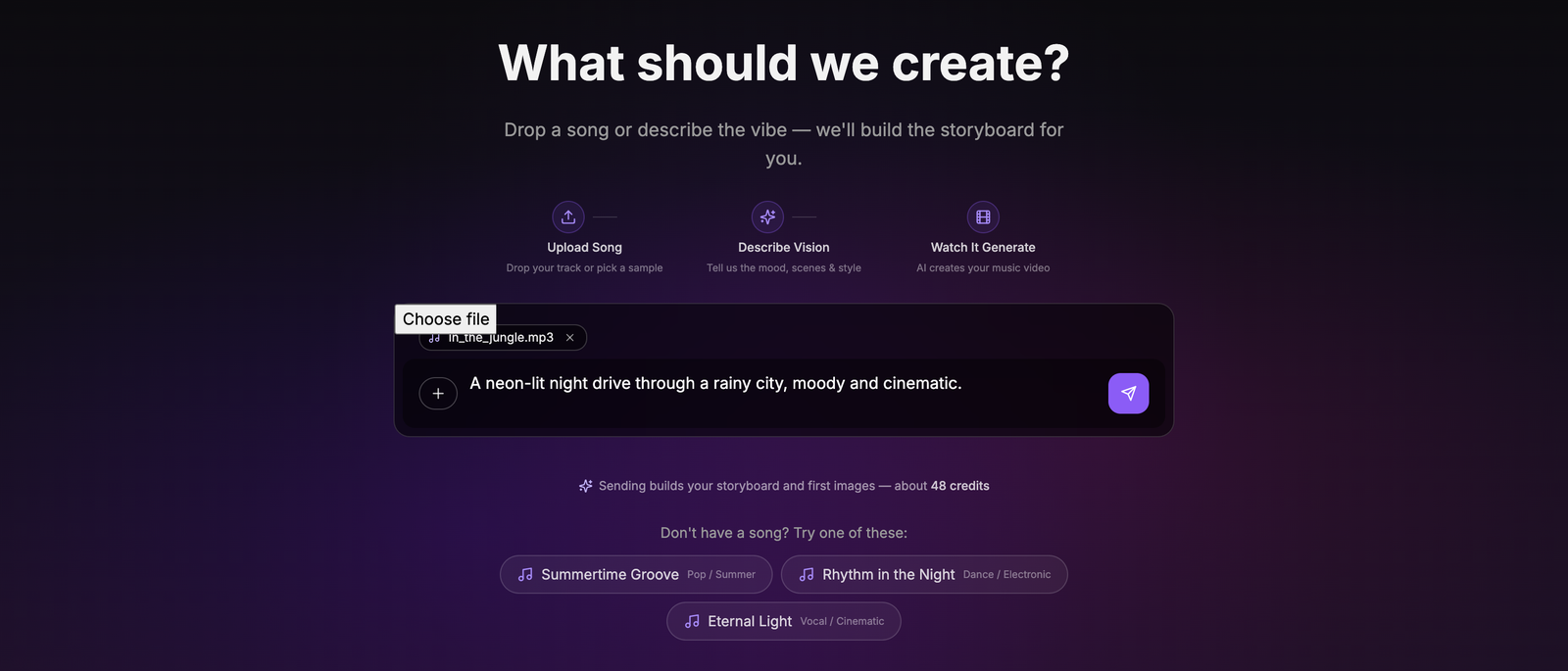
Two things to notice before you send:
- The credit cost is stated under the box. Because there's no approval step any more, pressing send is the decision to spend. The number comes from the same pricing the charge uses, so what you see is what you pay. It says "about" because the estimate prices a standard 30 seconds while the charge prices the shot list actually written, which can land a credit or two either side.
- Your song is analysed while you type. Tempo, energy sections and lyrics are worked out the moment you attach the file, not when you send, so you're not waiting on it.
Then press send and leave it alone:
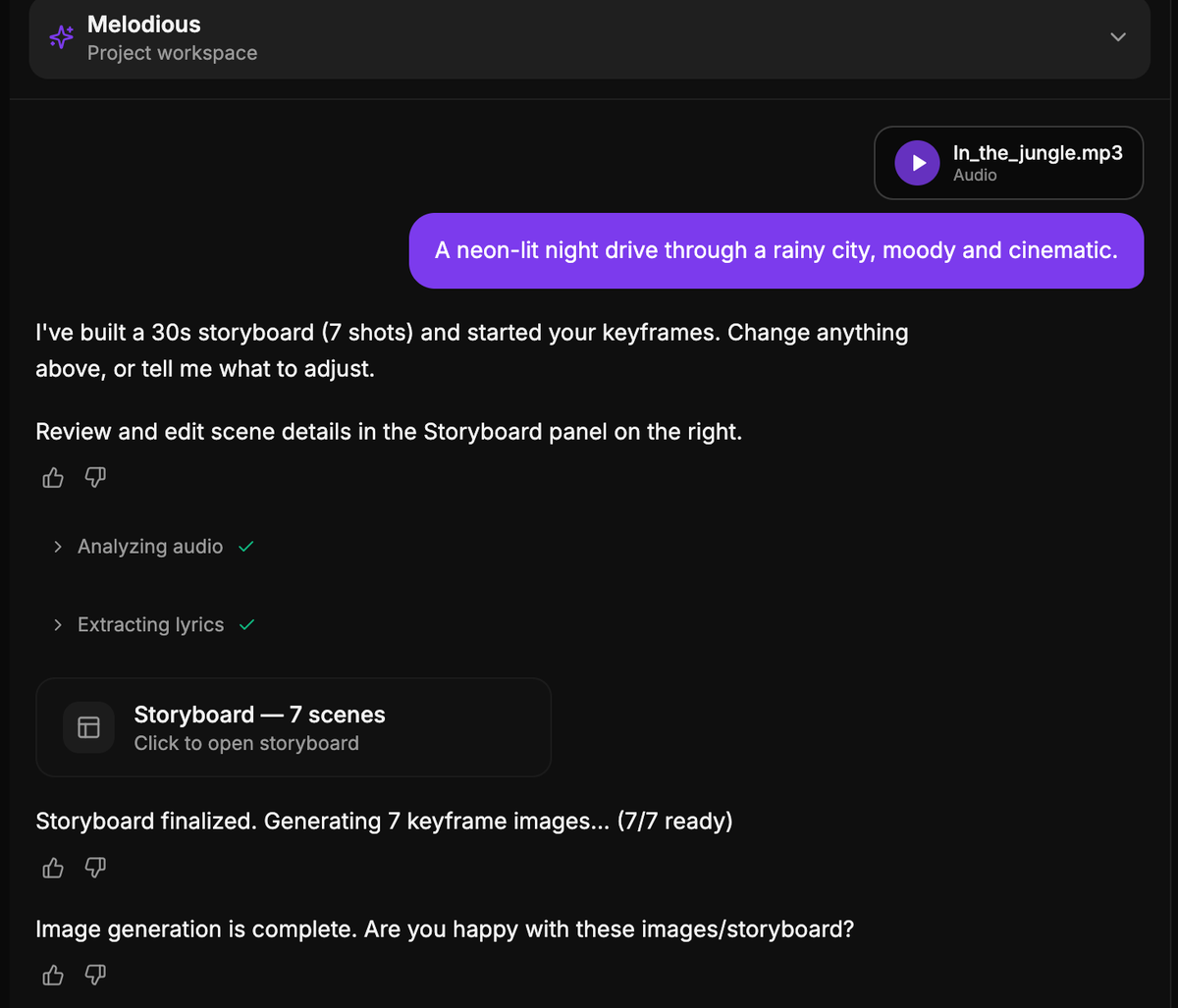
One message in, and you have a finished storyboard and seven keyframe images. You clicked nothing in between.
What Melodious decides for you
| Decision | What it picks | Change it by | |---|---|---| | Length | 30 seconds | Asking in chat, then regenerating | | Pacing | Balanced (roughly 6–8 second shots) | Asking in chat | | Shot count | Whatever fits 30 seconds at that pacing | Adding or deleting scenes in the storyboard panel | | Look and direction | Read from your prompt and the song's tempo and sections | Editing scene prompts, or replying in chat |
The first run is always a 30-second clip. That's deliberate: it's the cheapest thing worth looking at, it's available on every plan, and it fills the screen fastest. Longer videos are still available — ask for one once you've seen the storyboard, which is a much easier judgement than picking a length before you've seen anything.
What still needs a click
Generating the video does. That gate has not moved. Turning your keyframes into video clips is the expensive stage, and it still has its own separate approval step — Melodious will never start a render because you sent a chat message.
So the shape of a project is now:
- One message → storyboard + keyframe images. No clicks.
- Look at it. Edit any scene, redo any keyframe, ask for changes in chat.
- You approve the video render. Explicitly, when the stills look right.
The storyboard is still yours to change
Nothing about the storyboard is locked because it was written automatically. In the storyboard panel you can still:
- Edit any scene's title or prompt (changes save as you type)
- Add or remove scenes
- Regenerate a single keyframe that missed, without touching the others
- Reply in the composer to steer the whole plan — "make it darker", "add a city skyline", "make it 60 seconds"
Reacting to a real storyboard is much easier than describing one from scratch, which is the whole reason the questions moved to after the artifact instead of before it.
Common questions
Am I charged the moment I press send? Yes — for the keyframe images only, at the figure shown under the composer. That's roughly 8% of what a full 30-second video costs. The other ~92% is the video render, which you still approve separately.
What if I'd rather plan it out in chat first? Send a message without a song attached and Melodious will talk it through with you as before. The automatic run only fires when a prompt and an analysed song are both there on the first message of a project.
Does this make my video worse? It makes the same storyboard you'd have got after answering the questions — the difference is that Melodious now answers the easy ones from your song's tempo and structure instead of asking you. Everything it decided is still editable afterwards.
Why 30 seconds when my song is three minutes? So the first run is cheap and fast. A three-minute auto-run would spend six times as much before you'd seen anything. Ask for a longer version once the storyboard looks right.
Can I still change the length? Yes. Ask in chat and the storyboard is rebuilt at the new length.
It didn't generate automatically — why? The automatic run needs three things on the first message of a project: a song, some text describing what you want, and the song's analysis to have finished. Miss any one and you get the normal conversational flow instead.
Next steps
- Make your first music video — the full walkthrough, start to finish
- Editing scenes — reshape the storyboard after it's built
- Video duration & pacing — lengths, pacing and what each costs
- Credits & plans — what each stage costs