How to Make a Lyric Video Without After Effects: Every Route, Honestly Compared
You do not need After Effects to make a lyric video. The realistic routes are a template editor like Canva or CapCut, where the design is handed to you and you still place every line by hand; an auto-caption tool, which times words automatically but is built for speech and struggles with sung vocals; a free editor such as DaVinci Resolve, which is After Effects' workload without its price; or a tool that derives word timing from the song's audio. Choose by which part of the job you want to own. After Effects' real cost is not the look — presets and templates give you that — it is timing every line to the vocal by hand, which is hours of nudging keyframes and the reason most first attempts get abandoned. Pick the route that removes the timing, not the one with the prettiest template.
Your first 30-second storyboard is free. Plans from $19/month.
What actually replaces After Effects here?
Most people arrive at this question from one of two directions. Either they looked at After Effects, saw the price and the interface, and decided not to start. Or they did start, got a look they were reasonably happy with, and then discovered that the look was the easy half.
The advice you find is mostly a list of tools. That list is not wrong, but it answers a question nobody asked. Every one of those tools can put text on a screen; the differences that matter are further in, and they all reduce to a single question: who decides when each word appears? Sort the alternatives by that and the choice gets simple. This post is the "without After Effects" branch of our main guide on how to make a lyric video — that one covers the craft regardless of tool, this one is about which tool, and what each one leaves you holding. If the lyrics are only half of what you want on screen, how to make an AI music video covers the visuals underneath them.
What After Effects genuinely gives you
Worth being accurate about this, because the tool-comparison genre tends to caricature it. After Effects is more capable than everything else in this article, and it is not close.
What it does that nothing else on this list matches:
- Per-character text animators. You can offset an animation across the letters of a word so it ripples, and control the offset curve. This is the backbone of real kinetic typography.
- Expressions. Text properties can be driven by code — including by the amplitude of the audio layer itself — so type can react to the track rather than sit on top of it.
- A real compositing environment. Lights, cameras, 3D space, motion blur that is actually calculated, and a plugin ecosystem two decades deep.
- Precision. Every property of every layer is keyframable to the frame. If you can describe a motion, you can build it.
If the type in your head is the performance — words flying through a 3D room, letters breaking apart on the snare — After Effects is the honest answer and you should learn it. The claim in this article is narrower than "you don't need it": it is that most artists making a lyric video for their own single are not asking for any of the four things above, and are paying for them in hours anyway.
Why is a lyric video so slow to make? Timing, not design
Here is the shape of the work, which nobody tells you before you start.
Getting a good-looking lyric frame in After Effects is a solved problem. There are thousands of templates, the built-in text presets cover most of what a lyric video needs, and picking a heavy typeface with a drop shadow over a dark background gets you 80% of the way to a professional look in an afternoon.
Then you have to place forty lines of lyrics against three minutes of audio.
That means scrubbing the timeline to find where a line starts, setting an in keyframe, finding where it ends, setting an out keyframe, playing it back, discovering it is a third of a second late, nudging it, playing it back again — and doing that forty to eighty times. Dense sections are worse: a fast rap verse or a busy bridge can take as long as the rest of the song combined. Then you change one line's wording, and everything after it shifts.
That is the wall. It is not a skill problem — there is nothing clever to learn about dragging a keyframe — it is a volume problem, and it is why so many half-finished lyric video projects exist. When you evaluate an alternative, the only question that matters is whether it removes this or renames it.
What are the alternatives to After Effects for a lyric video?
| Route | What you actually do | Where it falls down | Best for |
|---|---|---|---|
| Template editor (Canva, CapCut templates) | Pick a design, type or paste your lyrics, place each line on the timeline | The template is timed to its demo track — your song's tempo and length mean re-timing, not filling in blanks | A single hook or a short social cut |
| Free NLE (DaVinci Resolve, CapCut manual) | Build the look yourself, then time every line against the waveform | After Effects' workload without the price; Resolve's Fusion has its own learning curve | Anyone who wants control and has the patience |
| Auto-caption tool | Upload audio, get an automatic transcript with timings, restyle it | Built for speech — sung vocals produce wrong words and wrong timings, so you proofread and re-time anyway | Spoken-word, podcasts, talking-head clips |
| Audio-derived lyric video | Provide the song and confirm the lyrics; timing is derived from the vocal | You direct through description rather than keyframes, so you get less frame-level control | An artist releasing their own track |
Two of these remove the timing problem and two do not, and it is not the split most people expect. A free editor and a paid template both leave you on the timeline. The split is about where the timing comes from — a human dragging keyframes, a speech model guessing, or the vocal itself.
Template editors: the design is not the bottleneck
Canva and CapCut both have lyric-video templates, and they look fine. The friction is structural rather than aesthetic: a template's motion is choreographed against the demo track it was built with. Your song has a different tempo, a different number of lines and a different structure, so you are not filling in blanks — you are re-timing someone else's animation while working around design decisions you did not make.
They are also built for short-form. A 30-second hook is comfortable. A three-and-a-half-minute track with sixty lyric lines is a long afternoon on a timeline that was not designed for that length.
Free editors: same job, no invoice
DaVinci Resolve deserves more credit than it usually gets in these lists. The free tier includes Fusion, a node-based compositor genuinely capable of most lyric-video work, and it is a professional tool rather than a limited demo. CapCut's manual mode is far easier to learn and enough for straightforward work.
But read the table row again: you are still placing every line by hand. Choosing a free editor over After Effects saves money and lowers the learning curve. It does not touch the hours.
If you take this route, one habit halves the pain: before you place a single lyric, play the track through once and drop a marker on every downbeat that opens a section, then a second pass tapping a marker at the start of each vocal phrase. Snapping text to markers is far faster than scrubbing for each line individually, and it keeps your lines grouped by musical phrase rather than by whatever felt right at the time — which is also what stops the finished video feeling arbitrary.
Why auto-captions struggle with sung vocals
This is the route people expect to work, and understanding why it disappoints is the most useful thing in this article — because it also tells you what a good solution has to do.
Automatic captioning is speech recognition, and speech recognition is trained on people talking. Singing breaks nearly every assumption in that training data:
- Vowels are held. A syllable that passes in a fraction of a second in conversation might be sustained across a whole bar in a chorus. Models trained on speech rhythm have no template for that, so word boundaries land in the wrong place.
- Pitch moves. Melody takes the voice across a range conversation never uses, and melisma — one syllable sung across several notes — reads as several separate sounds.
- There are several voices. Harmonies, doubles and stacked backing vocals look to the model like overlapping speakers in a noisy room.
- The instrumental masks consonants. The plosives and fricatives that mark where one word ends and the next begins are quiet, high-frequency, transient sounds — sharing that space with hi-hats, cymbals and guitar attack. Those are exactly the cues being buried.
So you get two failures at once: the words are wrong and the timings are wrong. You end up proofreading a transcript and re-timing lines, which is the After Effects problem plus a correction pass.
The fix follows from the diagnosis. Two things have to change. First, separate the vocal from the instrumental so the model hears the voice rather than the mix. Second — and this is the part that matters most — stop asking the model what the words are. You already have the lyrics. You wrote them. Aligning known text to an audio signal is a fundamentally easier problem than recognizing unknown text, because the model only has to answer when, never what.
Any tool that reads your text and guesses the timing from it has the problem backwards. Timing is a property of the recording, not of the words.
If you are locked into an auto-caption tool anyway, two things make it survivable. Feed it the cleanest vocal you have rather than the final master — an a cappella stem or a rough vocal bounce, if your mix session is still open — because you are removing the masking rather than asking the model to hear through it. And treat the output as timings only: paste your real lyric sheet over the transcript line by line instead of correcting the machine's words, which is faster and stops a plausible-sounding mishearing surviving the edit.
Where audio-derived timing fits
That is the approach Melodious takes for lyric videos, and it is worth describing precisely because the category is full of vaguer claims.
The vocal is isolated from your mix, word-level timings are derived acoustically from that isolated vocal, and those timings are aligned against the lyrics you have confirmed. No language model is asked to estimate when a line happens by reading it. And because a mis-heard word would otherwise get burned into the render permanently, you correct the extracted lyrics before the video is rendered — that step exists specifically so a typo is a text edit rather than a re-export.
Three caption styles ship:
- Karaoke Highlight — each word sweep-fills as it is sung, the classic sing-along treatment
- Line Reveal — lines fade in over the visuals, understated and cinematic
- Bold Center — large centered word-pop, built for social feeds
Lyric captions are not a Pro-only feature.
The visuals behind the words come from the same pass over the audio. Attach a song, describe what you want in one message, and the storyboard is written and every keyframe image generated in the same run — no interview, no length picker, nothing to approve before the images exist. What it costs is stated under the composer before you send:
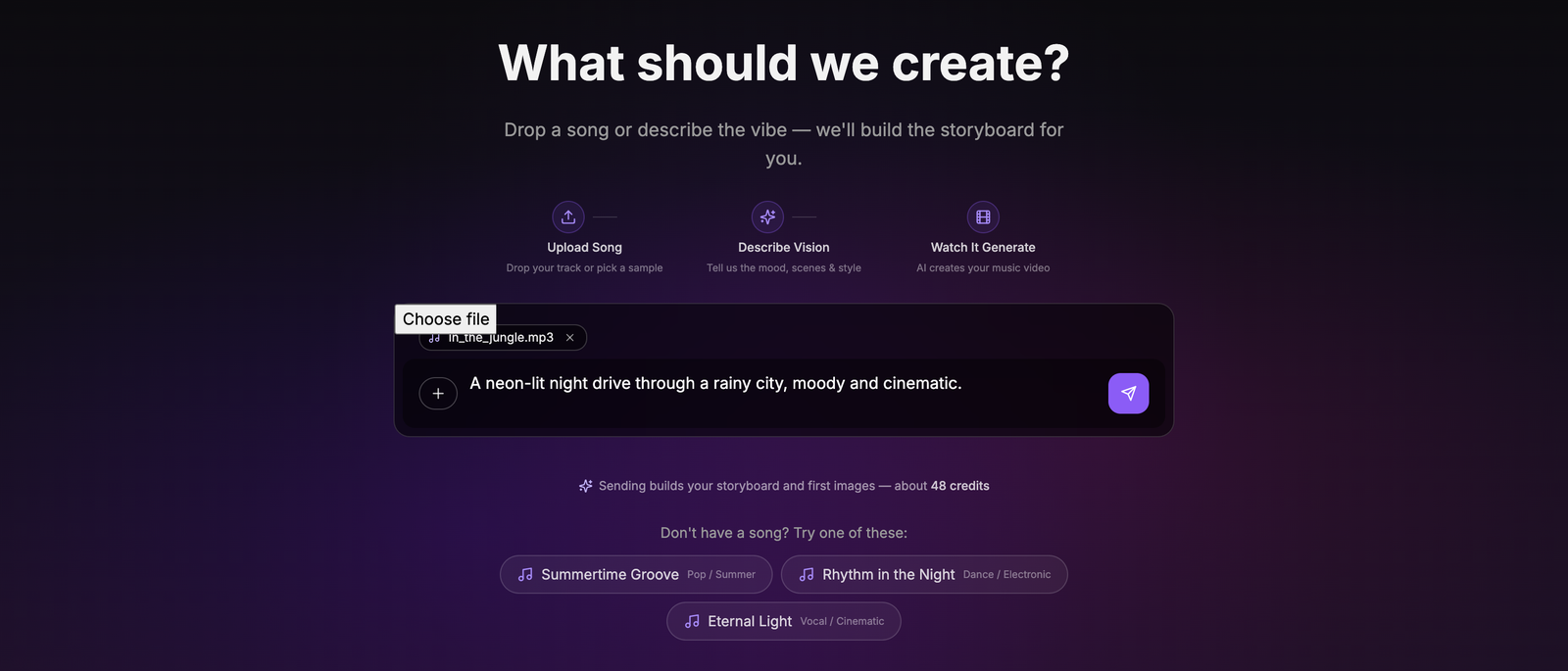
Turning those stills into video is a separate, explicit approval — sending a chat message never starts a render. New signups get 70 free credits, which covers a storyboard's keyframes rather than a finished video, so you can see a real storyboard for your own song before deciding whether to pay for anything.
The honest limitation: you are directing through description rather than keyframes. You do not get frame-level control over how a letter moves, and if per-character choreography is the point of your video, this is the wrong route and After Effects is the right one. What you get instead is the timing problem removed and iteration made cheap.
Mistakes that make a no-After-Effects lyric video look cheap
| Mistake | Why it hurts | Fix |
|---|---|---|
| Choosing a route by the template gallery | The look was never the hard part; timing is | Pick by who decides when words appear |
| Trusting an auto-caption transcript | Sung vocals produce wrong words and wrong timings | Proofread against your own lyric sheet before rendering |
| Thin or light typefaces | Platform re-encoding smears fine strokes into noise | Heavy weights, brightness contrast, a hard edge |
| Placing lines exactly on the syllable | Viewers need a beat to read | Lead each line slightly ahead of the vocal |
| Leaving the background busy under the text | Words compete with motion and lose | Dim or blur the region behind the lyrics |
| Fixing typos after the render | The text is burned into pixels | Correct the lyrics before the video is rendered |
| Scaling a 16:9 cut down for vertical | Text lands outside the safe area or gets cropped | Re-lay out for the tall frame — see our aspect ratio guide |
Which route should you pick?
A short decision rule, in order:
- Is the type the performance? Letters animating individually, text driven by the audio waveform, motion nobody else has. → After Effects. Nothing here substitutes.
- Do you want frame-level control and have the patience for a timeline? → DaVinci Resolve. Free, professional, and Fusion covers the compositing.
- Is it one hook for social, 30 seconds, done today? → A template editor. The timing volume is small enough not to bite.
- Is it your own full track, and you want the words and the visuals in one pass? → An audio-derived tool. This is the case the format is most commonly used for, and the one where hand-timing is least defensible.
Whichever you choose, the publishing layer is a separate job with its own rules — export specs that survive re-encoding, the title format people actually search, and what happens if you did not write the song. Our guide on making a lyric video for YouTube covers that half. And if the deeper reason you are avoiding After Effects is that you would rather not touch production software at all, making a music video without filming anything is the wider version of the same question.
The one-line version: After Effects is not too hard, it is too manual for this particular job. Pick the route that takes the manual part away, and spend the time you get back on the two things that decide whether a lyric video works — accurate timing, and text you can read on a phone.
Try it on your own track — attach the song, correct the lyrics it pulls out, and pick a caption style.
Frequently asked questions
Can you make a lyric video without After Effects?
Yes, and for most artists it is the right call. Four routes work: a template editor such as Canva or CapCut, a free non-linear editor like DaVinci Resolve, an auto-caption tool, or an AI tool that derives word timing from the audio and renders the video for you. The one thing to check before picking is how each handles timing — that is the part After Effects makes expensive, and several alternatives quietly hand it straight back to you.
What is the best free alternative to After Effects for a lyric video?
DaVinci Resolve if you want real control — its free tier includes Fusion, a node-based compositor that covers most of what a lyric video needs, and it is a genuine professional tool rather than a stripped demo. CapCut is faster to learn and fine for a straightforward hook video. Neither solves timing: in both, you are still placing each line against the waveform by hand. Free means free of cost, not free of the work.
Why do auto-generated captions get song lyrics wrong?
Speech recognition is trained on speech, and singing breaks most of its assumptions. Vowels are held far longer than in conversation, melody moves pitch across a range speech never uses, harmonies and doubled vocals read as several people talking at once, and the instrumental masks the consonants that mark where one word stops and the next starts. The result is wrong words and wrong timings. Aligning lyrics you already have against an isolated vocal is a different and much more reliable problem than transcribing a full mix from scratch.
Is CapCut or Canva good enough for a lyric video?
For a single hook or a short social cut, yes. For a full song, the friction shows up in two places. A template's timing is built around its demo track, so your song's tempo and structure mean re-timing rather than filling in blanks. And both are laid out for short-form content, so a three-minute track with forty lines of lyrics becomes a long manual pass on a timeline that was not designed for it.
How does Melodious time the lyrics if I am not keyframing them?
It isolates the vocal from your mix, derives word-level timings acoustically from that isolated vocal, then aligns those timings against the lyrics you have confirmed — so a word lands where it is genuinely sung rather than where a language model guessed it would be from reading the text. You correct the extracted lyrics before the video is rendered, which is where a mis-heard word gets fixed instead of being baked into the final file. Three caption styles ship: Karaoke Highlight, Line Reveal and Bold Center. Lyric captions are not a Pro-only feature.
When is After Effects still the right tool for a lyric video?
When the type is the performance rather than the label. Per-character animation, text driven by expressions, letters moving in 3D space, or a signature look you intend to reuse across a whole campaign are all things After Effects does that nothing on this list matches. It is also the right answer if you are being paid to make lyric videos, because the time you spend learning it amortizes across every future job. For one artist releasing one single, it rarely pays back.
Skip the keyframing, keep the control
Attach your track, pick a caption style, and correct the extracted lyrics before the video is rendered — the timing comes from the vocal, not from you nudging every line.
Start a lyric video