Melodious v0.70.0: characters, Release Kit, steadier chat
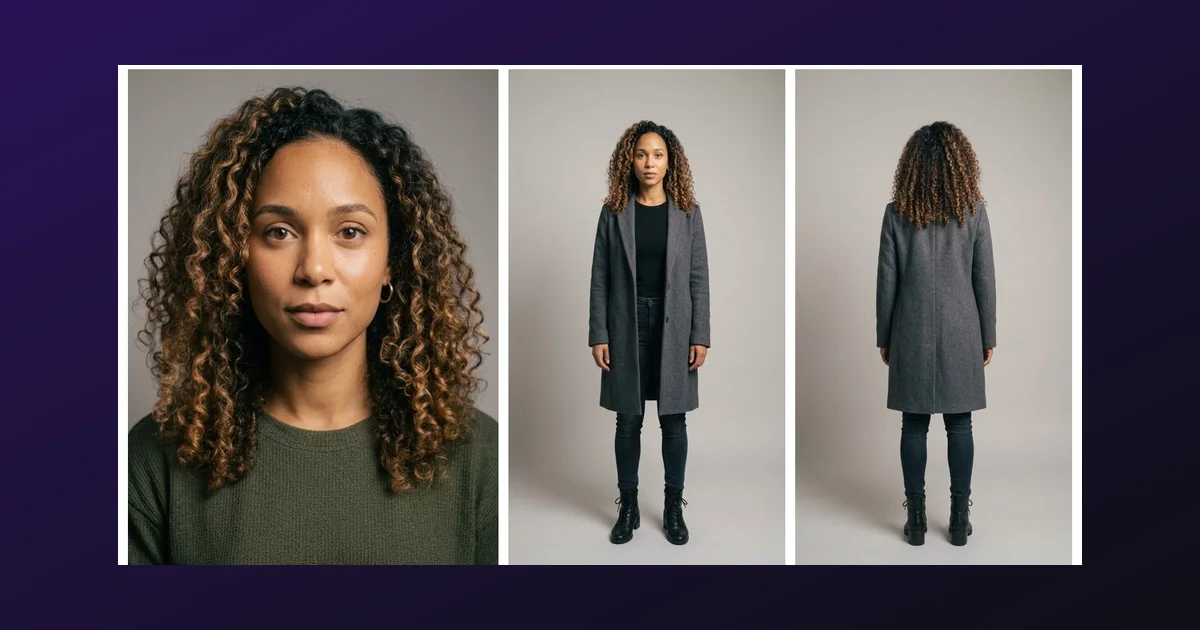
In Melodious, an AI music video maker, you create a character once: upload one face photo, describe the outfit from head to toe with the shoes named, and Melodious draws full-body front and back views. Storyboard shots without lip sync are then drawn from the face, front and back, and lip-sync shots use the face. Not every shot will match every time. A character costs 30 credits, or 15 with your own full-body photo. The same notes also cover the 72-Hour Release Kit and a steadier director chat.
Plans from $50/month, cancel anytime. Starter makes a 1-minute video with lip sync a month.
What is in Melodious v0.64 to v0.70?
Melodious (melodious.ai) is an AI music video maker: you upload a song, a director in the chat storyboards it with you, and Melodious draws the shots and films the video. This post covers what shipped from v0.64 to v0.70, plus two fixes from v0.72.0 on 27 November. For the whole process, see how to make a music video from your song. Previous release notes: v0.63.0.
| What | What it does |
|---|---|
| Characters | One photo and an outfit become a face, a front view and a back view your shots are drawn from |
| 72-Hour Release Kit | Melodious makes the music video for you: $997 with cuts, a Canvas and six bonuses, $497 for the video only |
| Kit Room | One page for your order: your song, your first scene to approve, your files |
| Steadier chat | Waits up to two minutes, says when it is slow, shows what it knows about your song, has a backup |
| Smaller fixes | Lip sync on long WAV songs, clearer credit messages, two free tool results before an email |
How do I create a character from one photo?
You can create a character once, from either of two places: the + in the chat, then Choose from my assets and Characters, or Assets and Characters. The first tile is Create a character. The chat never starts it for you, so nothing is drawn or charged unless you tap. Want the guide rather than the release notes? See reusable AI characters for music videos.
There are four steps: Photo, Outfit, Approve, Save.
- Photo. A clear face photo, a name, a role if you like, and a tick that you have the right to use the person's face. A full-body photo is optional. If you add one, Melodious uses it as the front view as it is.
- Outfit. Say what they wear, head to toe, and name the shoes. The step asks for the shoes if you leave them out, because shoes are easy to lose between shots.
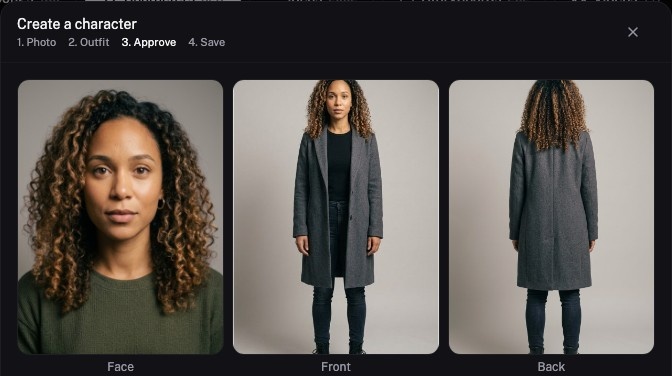
- Approve. You see the face, the front and the back side by side. Change something redraws only the full-body views: both at 30 credits again, or only the back at 15 credits if you added your own full-body photo.
- Save. The character joins your message as one card marked Character · 3 views, not three loose pictures.
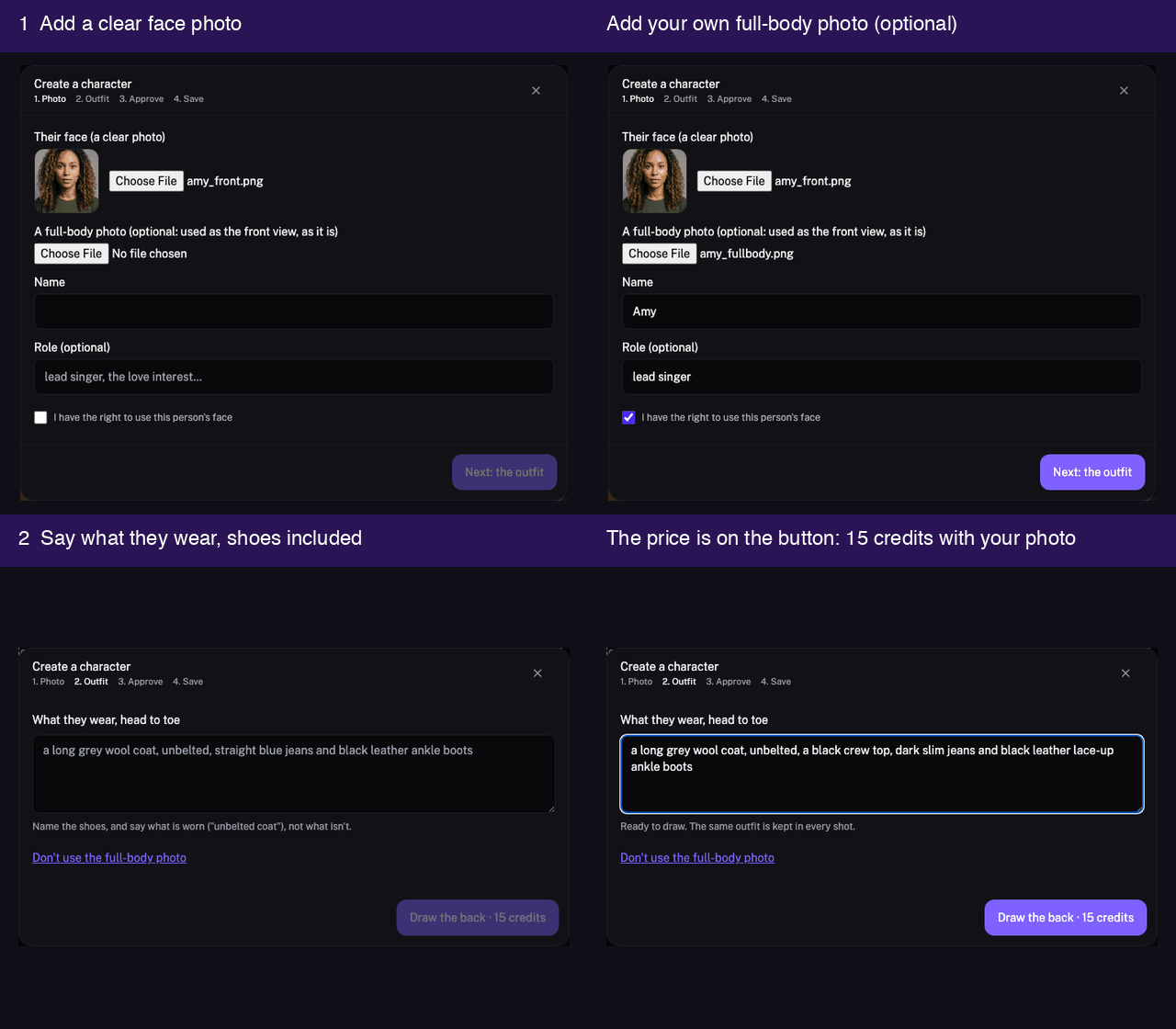
The price is on the button before anything is drawn. The two views cost 30 credits, or 15 credits if you bring your own full-body photo, and if a drawing fails you are refunded (how refunds work). Characters you already have, a singer you added or one Melodious drew for you, show Add front and back views in Assets, so you can upgrade them without starting again.
What does a character change in a video?
Before characters, every shot was drawn from the shot's text and one face photo. Everything the photo did not show, the shoes, the back of the coat, a belt, was guessed again in every shot. A lead's boots could change from one shot to the next, and a shot from behind had no reference for the back at all.
Since v0.72.0, a storyboard shot without lip sync is drawn from all three: the face, the front and the back. A shot from behind puts the back view first. Lip-sync shots use the face only. A frame can use at most four photos of people, so when two or more characters share a frame, some views are left out. The outfit you wrote also goes into the storyboard prompt for each shot the character is in, with the shoes named.
Here is the Approve step for Amy, Melodious's host, with her own full-body photo as the front view: the face, the front, and a back view Melodious drew. Under them, the app offers Change something and Save character. The picture is cropped from the app's screen.
This is not a promise of perfect consistency: not every shot will match every time. Check your storyboard before you make the video, and use Edit prompt on any shot that drifts. To write a brief that holds without a sheet, read how to write an AI character brief that holds, and for the wider idea, reusable AI characters for music videos. For how photos, people and keyframe approval work, see the help page on character consistency.
What is the 72-Hour Release Kit?
The Release Kit is the done-for-you version. You send a song, and Melodious makes the music video. The full Release Kit is $997: the video with lip sync on your vocal, cuts for TikTok, Reels and Shorts, a Spotify Canvas (see also Spotify's own Canvas guidelines) and the six bonuses below. Video Only is $497: the video and two vertical cuts. Your first scene arrives within 24 hours of your song; once you approve it, the Release Kit arrives within 72 hours and Video Only within 5 days. Order at least 7 days before your release date, and if your kit is not delivered before it, you are refunded in full. The page at melodious.ai/release-kit lists each option and its price.
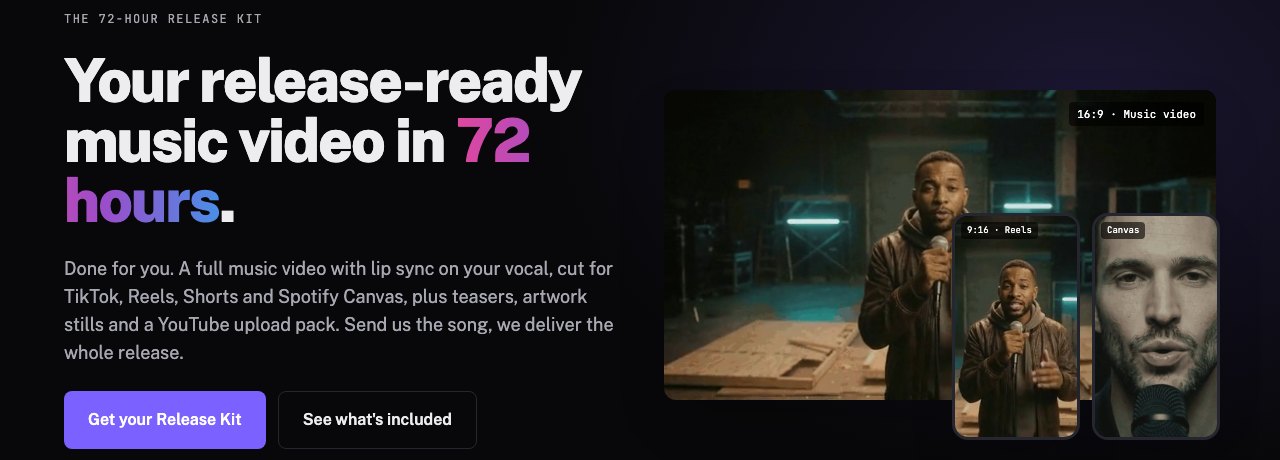
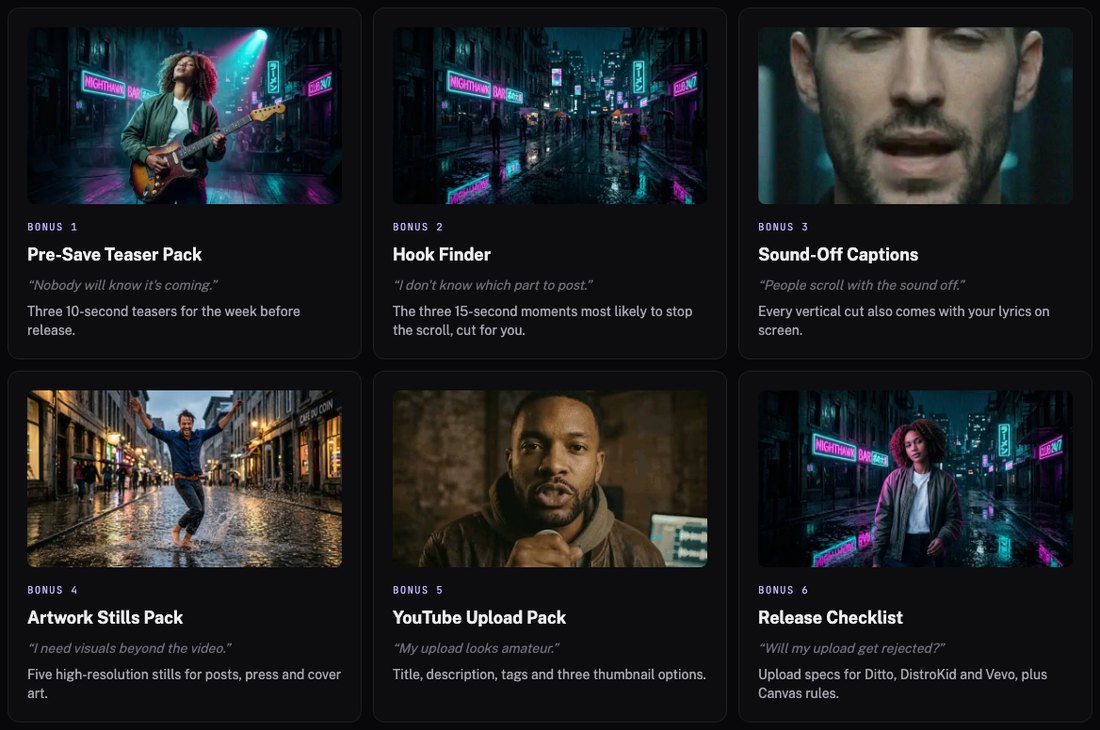
The six bonuses in the full kit are made from your video:
- Pre-save teaser pack, three 10-second teasers for the week before release.
- Hook Finder, the three 15-second moments most likely to stop the scroll, cut for you.
- Sound-off captions, your lyrics on screen on every vertical cut.
- Artwork stills, five high-resolution stills for posts, press and cover art.
- YouTube upload pack, a title, description, tags and three thumbnail options.
- Release checklist, upload specs for Ditto, DistroKid and Vevo (for example DistroKid's artwork requirements), plus Canvas rules from Spotify's Canvas content policy.
The Hook Finder also exists on its own as a free tool at melodious.ai/tools/hook-finder: choose a song and it shows the three best 15-second moments for TikTok, Reels and Shorts, with the reason for each. It runs in your browser, so your song never leaves your device. Planning a release? How to release a song with a music video covers the order of work.
What happens after you order the Release Kit?
Every Release Kit order has its own Kit Room. Right after you pay you land on Your kit starts here, where you send your song, the vibe in a sentence, a few references and photos of the singer for lip sync. Then the Kit Room shows:
- where your kit is, with a live countdown to the next step;
- your first scene, to approve or change;
- your finished files, with an upload checklist;
- messages with the team.
A 15-minute kickoff call is there if you want one. You get an email when your order is booked, when your first scene is ready and when your kit is delivered, plus a reminder if Melodious is still waiting on your song.
Why is the director chat steadier?
Three changes for the moment you send your first message and nothing seems to happen:
- It waits longer. The director now waits up to two minutes for its first reply instead of 20 seconds before saying it could not answer, so a slow reply arrives instead of failing.
- It tells you. After about 8 seconds the chat says "Taking a little longer than usual." At about 25 seconds it changes to "Still working on it. Thanks for waiting.", and after a minute to a longer note.
- It shows what it already knows. While the director thinks about your first message on a new project, the chat shows a line from your song's analysis: its length, tempo and first chorus, instead of only "Thinking…".
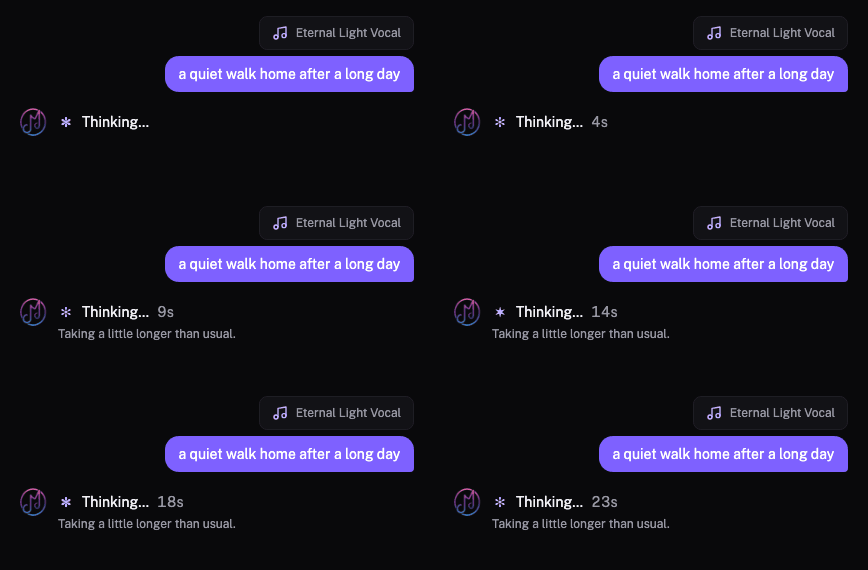
The capture above is from Melodious's test environment, with a test song. And there is a backup: if the director's main model cannot answer, because the model provider is out of credit, overloaded or silent, a second model answers the same message instead of showing "I couldn't answer just now". According to the v0.70.0 changelog, the first words also come back in about 2 seconds instead of about 8.
What else changed from v0.68 to v0.72?
- Lip sync works on long WAV songs. WAV songs longer than about two and a half minutes failed analysis, and every scene became a cutaway. They work now.
- Clearer messages when credits fall short. If your credits do not cover the video, the director says how many more it needs and how to make a cheaper version.
- Shots keep the plan's outfit too. Without a character, the outfit the plan gives the lead now reaches every frame they are in, shoes included.
- Lip sync is asked before the plan (v0.72.0). If your account and song allow lip sync, someone sings on screen and you have not chosen yet, the director's question cards before the plan ask "Should their lips follow the words?" If your own words ask for it, such as "lip sync" or a singer who sings to camera, Yes, lip sync is already ticked, and you still confirm it.
- Free tools show two results first. Your first two results across the free tools appear in full, with an optional email signup under them. Tap tempo and the Camelot wheel are never locked.
- Your chat messages are saved straight away, even on a slow connection.
The full list is in the changelog, and how Melodious writes release notes explains how these pages are checked. If a character looks off, say so in the chat or reply to any Melodious email.
Make your first character
Open Assets, choose Characters and tap Create a character. The price shows on the button before anything is drawn, and a drawing that fails is refunded.
Open the studioFrequently asked questions
How do I create a character in Melodious?
Open Assets, choose Characters and tap Create a character, or open the + in the chat, choose Choose from my assets, then Characters. Add a clear face photo, a name and a tick that you have the right to use the person's face (only add photos of yourself, your band or people who have said yes), describe the outfit from head to toe with the shoes named, check the price on the button, and approve the front and back views. A saved character joins your next message as one card.
How much does a character cost?
A Melodious character costs 30 credits for the two full-body views, the front and the back. If you add your own full-body photo, it is used as the front view and only the back is drawn, so it costs 15 credits. Change something redraws what was drawn, at the same price again. The price is on the button before anything is drawn, and if a drawing fails it is refunded.
What is the 72-Hour Release Kit and what does it cost?
It is a done-for-you order from Melodious: you send a song and the team makes the music video. The full Release Kit is $997: the video with lip sync, cuts for TikTok, Reels and Shorts, a Spotify Canvas and six bonuses, within 72 hours of your approval. Video Only is $497: the video and two vertical cuts, within 5 days of your approval. Your first scene arrives within 24 hours of your song, and if you order at least 7 days before your release date and the kit is not delivered before it, you are refunded in full.
Does a character guarantee the same look in every shot?
No. Storyboard shots without lip sync are drawn from the face, front view and back view, lip-sync shots use the face, and a frame can use at most four photos of people. Not every shot will match every time. Check your storyboard before you make the video, and use Edit prompt on any shot that drifts.
What is the Kit Room?
The Kit Room is the page in Melodious for your Release Kit order. After you pay you send your song, the vibe in a sentence, a few references and photos of the singer. Then the room shows where your kit is, a countdown to the next step, your first scene to approve or change, your finished files with an upload checklist, and messages with the team.
What happens if the director is slow to answer?
The Melodious director keeps waiting, up to two minutes for its first reply, instead of giving up after 20 seconds. While it works the chat says when a reply is taking longer than usual, and if the director's main model cannot answer, a second one answers the same message.